SurveyWhat almost stopped you from signing up? · 28 Oct
“Asked for company details before showing a single screen”
“What you see is all there is.” Daniel Kahneman · Thinking, Fast and Slow · 2011
Feedback from four places, unsorted
Survey Wrote on Monday, got an answer on Thursday
Google Play Good app, but nobody answers the help form
E-mail Three e-mails to fix one typo on my invoice
Google Play Wasn't sure what I'd get before creating an account. The store screenshots don't show much either
Typeform Signed up but couldn't tell what happens next
Survey Asked for company details before showing a single screen
Survey Wanted to try it, ended up filling out a form instead
Typeform Ten fields in before I saw any actual feature
Named insights, with their quotes
Live example · demo data
64 pieces of feedback from four places: a survey on the site, a Typeform export, Google Play reviews and support e-mails. RawQuotes read them together and named four insights. Click one.
| Insight | Answers | Survey on the site | Google Play reviews | Support e-mails | Typeform export |
|---|---|---|---|---|---|
| Sign-up asks for too much before people see the app (Problem) | 14 | 6 | 3 | 2 | 3 |
| Support replies take days (Problem) | 10 | 2 | 3 | 5 | 0 |
| Offline mode is why people stay (Praise) | 8 | 3 | 4 | 1 | 0 |
| Calendar sync breaks after updates (Problem) | 6 | 1 | 3 | 2 | 0 |
| Did not fit a repeating insight | 26 | 14 | 5 | 2 | 5 |
| Total | 64 | 26 | 18 | 12 | 8 |
People want to see the app before they give company details, a phone number or confirm an e-mail.
Backed by 14 from 4 sources
Survey 6 Google Play 3 E-mail 2 Typeform 3
Respondents' own words
“Asked for company details before showing a single screen”
“Ten fields in before I saw any actual feature”
“Wasn't sure what I'd get before creating an account. The store screenshots don't show much either”
“Hi, I gave up halfway through sign-up yesterday. Can you just send me a demo login?”
People want to see the app before they give company details, a phone number or confirm an e-mail.
Backed by 14 from 4 sources
Survey 6 Google Play 3 E-mail 2 Typeform 3
Respondents' own words
“Asked for company details before showing a single screen”
“Ten fields in before I saw any actual feature”
“Wasn't sure what I'd get before creating an account. The store screenshots don't show much either”
“Hi, I gave up halfway through sign-up yesterday. Can you just send me a demo login?”
Insight names and descriptions are written by the model. Everything else here, every quote and every count, comes from the people who wrote in.
Demo project with made-up feedback written for this page. Not a customer.
Put a short survey on any page with one script tag. Or bring feedback you already have: upload a CSV, Excel or JSON export, paste text, or send it through the API from n8n, Zapier or Make.
Everything in a project is read as one set. A complaint in a review and the same complaint in a survey can land in one insight. Every quote shows the source and the question it came from.
Once a project has ten complete responses in a period, matching feedback is grouped and named in one sentence: a problem, a piece of praise, or a reason. One imported review, e-mail or row counts as one response. Below ten, you get a count instead of a guess.
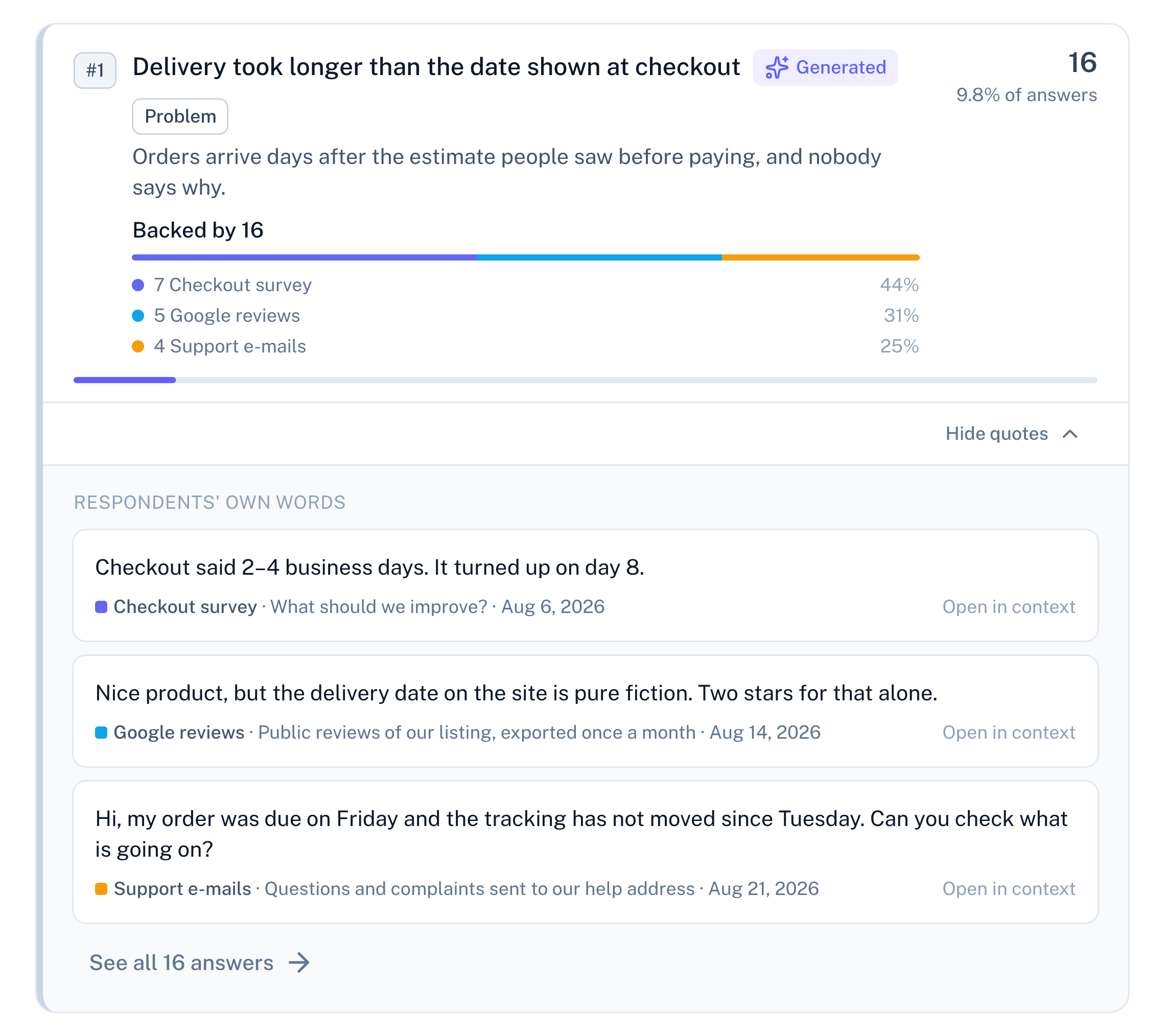
An insight is one sentence naming what people keep saying, with a count next to it. Open it and you get the feedback it was counted from, word for word, with nothing shortened or paraphrased. The list is exactly as long as the number says. Each quote shows its source and the question it answered. The insight's name and description are the only text there nobody wrote to you, and both are labelled as generated.
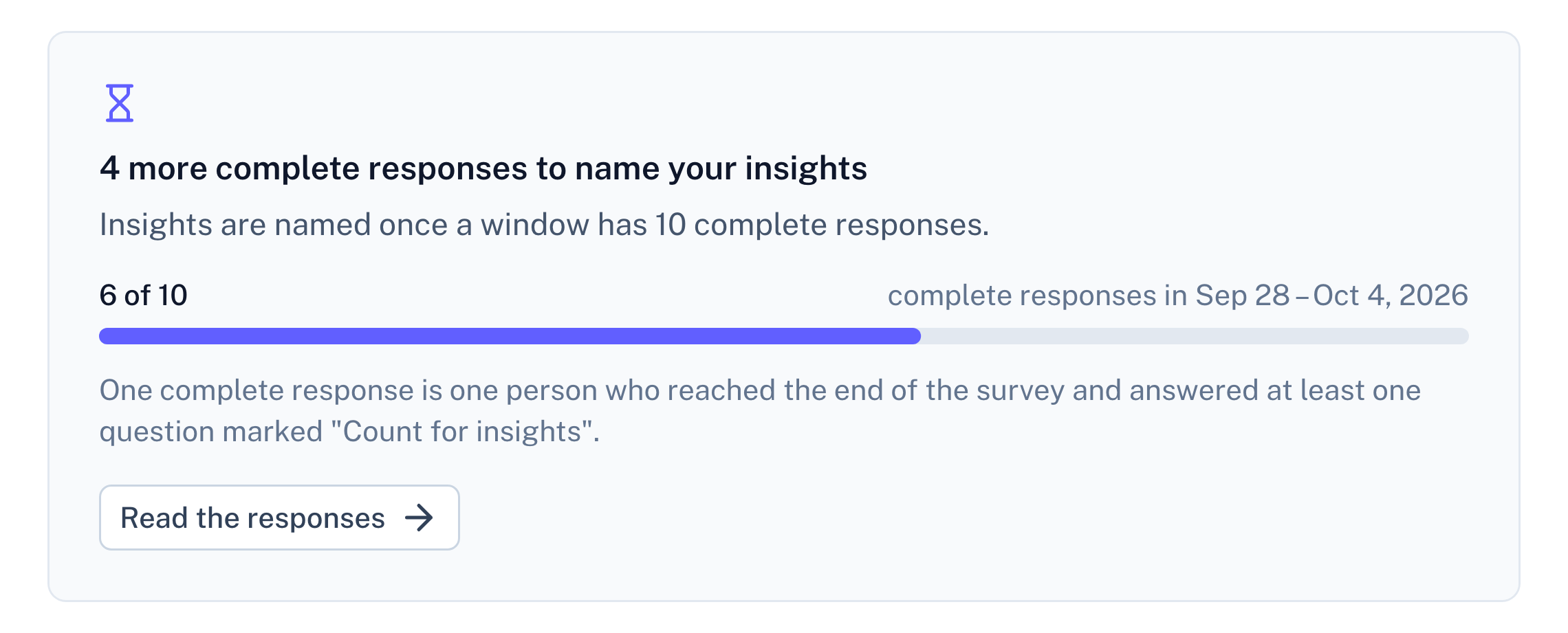
Grouping a handful of answers produces something that looks convincing and means nothing. So below ten complete responses this app shows no insights at all. It shows how many you have, how many it needs, how many are missing, and a link to the raw replies. One imported review, e-mail or spreadsheet row counts as one response, the same as one finished survey. Filter by one source, and an insight with fewer than three items from it says "below threshold for this source" instead of a number.
Insights are recalculated on a schedule. If a run fails, the panel says it failed and shows the last successful result with the date it was calculated — never a stale number pretending to be fresh, never an insight without a date. Your answers and filters keep working through it.
Two of those three are refusals, and that is the point. A tool that never says "I don't know" gives you no way to tell a real pattern from a filled screen. It also means there will be weeks when this app shows you nothing — we would rather do that than invent an insight.
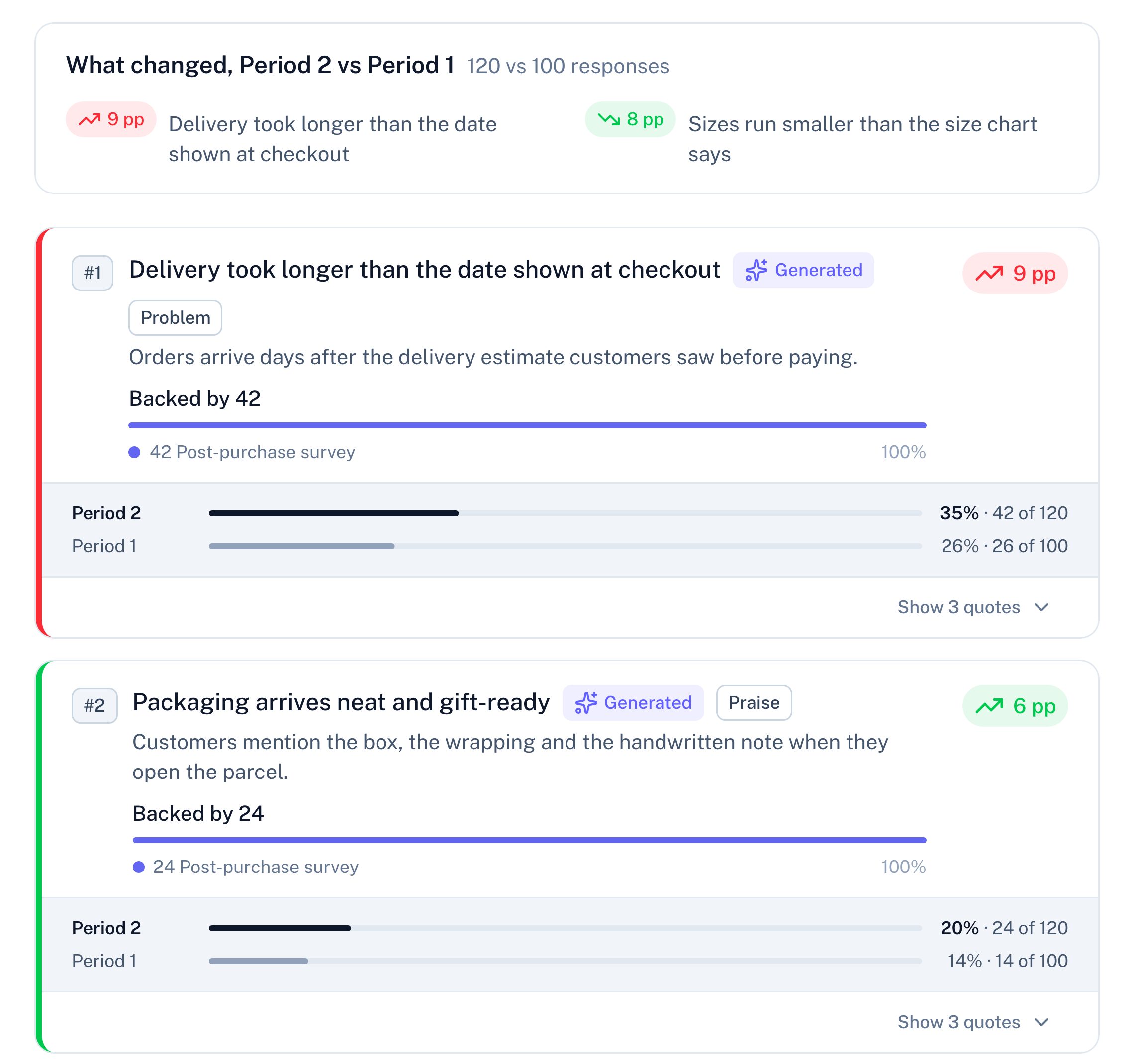
Pick a week or a month and compare it with any earlier one. Every insight shows its share of answers in both and how many percentage points it moved. A problem that grows is marked red and one that shrinks green; for praise it is the other way round, and insights that are neither stay grey. Each share is counted against that period's own responses, so a busier month doesn't read as a worse one. If fewer than three people mentioned an insight in the earlier period, it says "Not compared" instead of showing a number.
New: MCP server
Add the server to your agent.
Approve what it may do.
Ask. It reads insights with the quotes and responseId behind them, or hears “too few” under ten.
Basic and Pro plans, also in the 14-day trial
How it works with your agent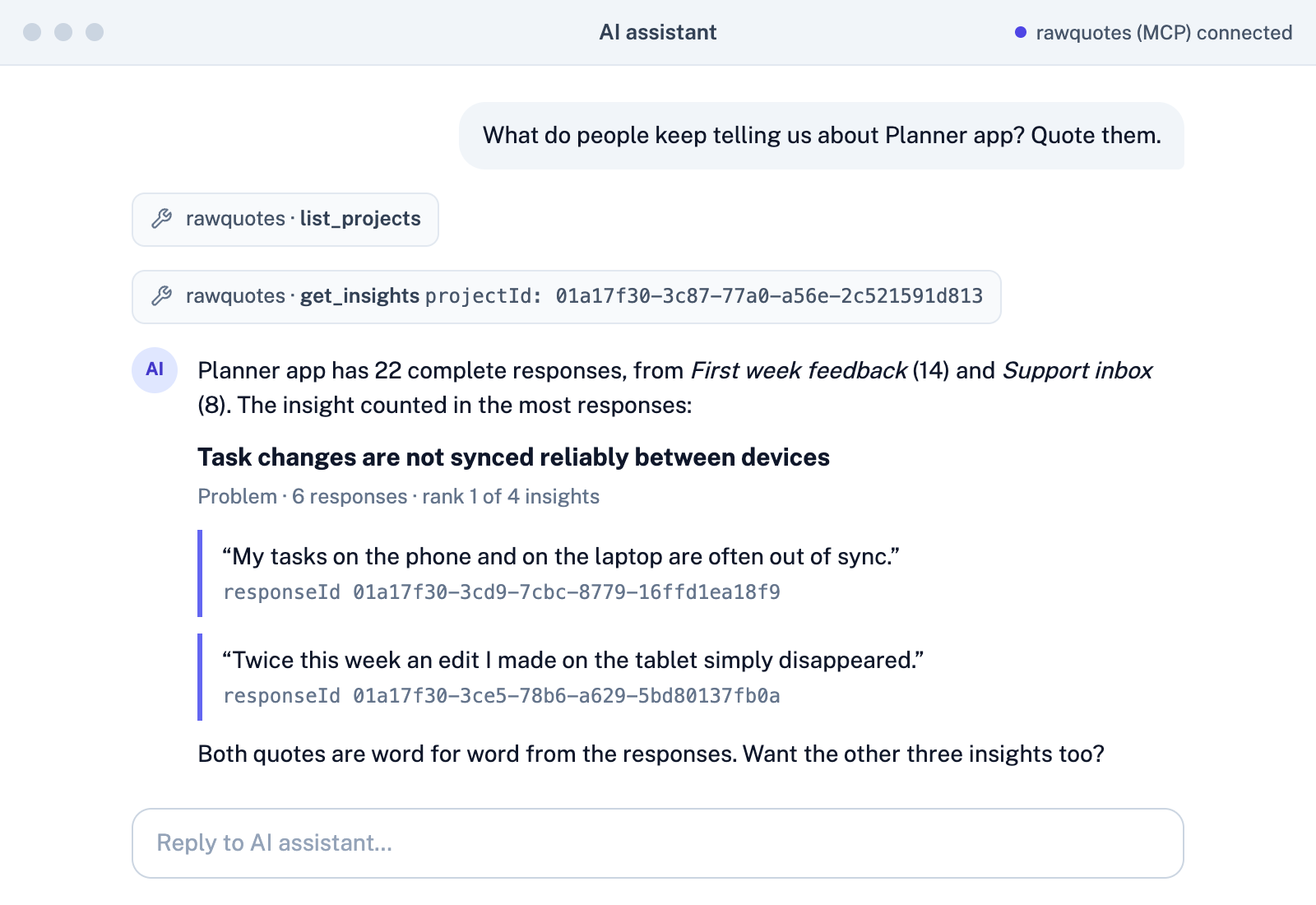
Before anything reaches the AI
People type an e-mail, an IBAN or a phone number into a survey without thinking, and support e-mails carry them in every signature. On our own server, before any text reaches our AI provider, we replace those details with a placeholder. The original stays in your account, and every quote you read comes from it. Masking is best-effort and misses some things: names, for example, are not masked. It still helps you meet GDPR's data-minimisation principle for the text we send to our AI provider. An agent you connect yourself gets the original text, and only if you allow it.
What leaves your account, and what the AI model sees, is in the privacy policy
Feedback
Shipping was fast, but nobody replied when I emailed kontakt.klient@example.com about a discount code for order order-00048.
Every plan runs on the same insights engine, wherever the feedback came from: quotes under every insight, and no insight below ten complete responses.
For businesses only. Cancel any time. Prices exclude VAT and other sales taxes. 1 AO = up to 1,000 characters of one answer
You can check every insight. It opens into the exact feedback it was counted from, nothing is named under ten complete responses, and a failed recalculation is shown as failed, never as a fresh result.
Yes. Upload a CSV, Excel or JSON export, paste text, or send it through the API from n8n, Zapier or Make (Basic and Pro). It's read together with your surveys, under the same rules.
There are fewer than ten complete responses in the period, counted across all your sources. You get a count instead of a guess: how many you have, how many are needed and how many are missing.
No. Survey answers and imported feedback go to our AI provider only to be grouped, and neither we nor the provider train any model on them.
Free, Basic and Pro, from $0. Every plan is a superset of the one below it — see the full pricing page.