Support e-mails

Support ticket analysis for recurring themes, quote by quote

Your inbox holds the reasons people get stuck, one message at a time. Paste the e-mails or tickets, or send them through the API, and RawQuotes names what keeps coming up, with the exact messages under every insight.

The same question, asked forty different ways

One person can’t find the invoice. Another asks where to download a receipt. A third writes “where is my bill??”. Every ticket gets an answer, and nobody counts how often it is the same problem.

From your inbox to insights in three steps

1
Copy the messages
Copy the e-mails or tickets you want read, from your inbox or your helpdesk. Only the message text is needed.
2
Paste them
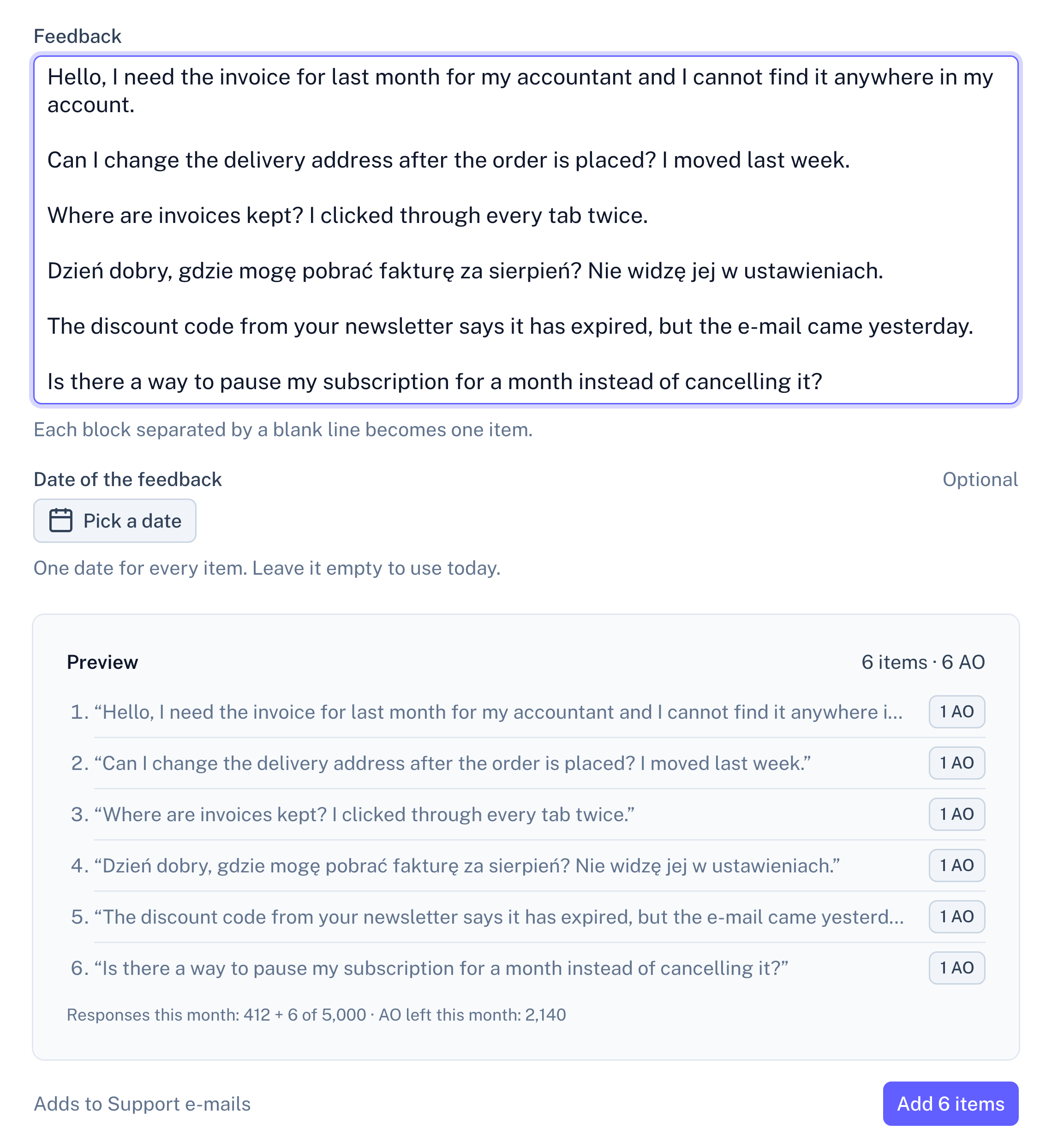
In a source, open Paste text and leave a blank line between two messages: each block becomes one item. Preview counts the items first, so an e-mail split by its own paragraphs shows up before you add it.
Panel screenshot of the paste screen for Support e-mails: a text box with six pasted messages, one of them in Polish, an optional date for the whole batch, and a preview listing the six items split on blank lines above an Add 6 items button

Example data

3
Read what repeats
Each message under an insight is quoted as you pasted it, so trim signatures and quoted replies before you paste.

No preset: a blank line starts a new item

Support e-mails come in by paste or through the API, not as a file with a preset. In a paste, every block between two blank lines is one item, quoted word for word.

An e-mail with blank lines between its paragraphs becomes several items, so remove them before you paste, or send the message through the API as one item. The date of the feedback is optional and applies to the whole paste; leave it empty to use today.

Every insight opens into the messages behind it

A short list of sentences, each naming a problem people keep writing in about, with the number of messages behind it. Open one and you read those messages word for word, so “how often do people ask where the invoice is” has an answer you can check.

From here on, every source works the same. All sources in a project feed one set of insights, and each insight shows how many items came from each one. The list under an insight is exactly as long as its count, a month can be compared with the one before, and only the insight’s name and description are written by the model, labelled as generated. How the analysis works
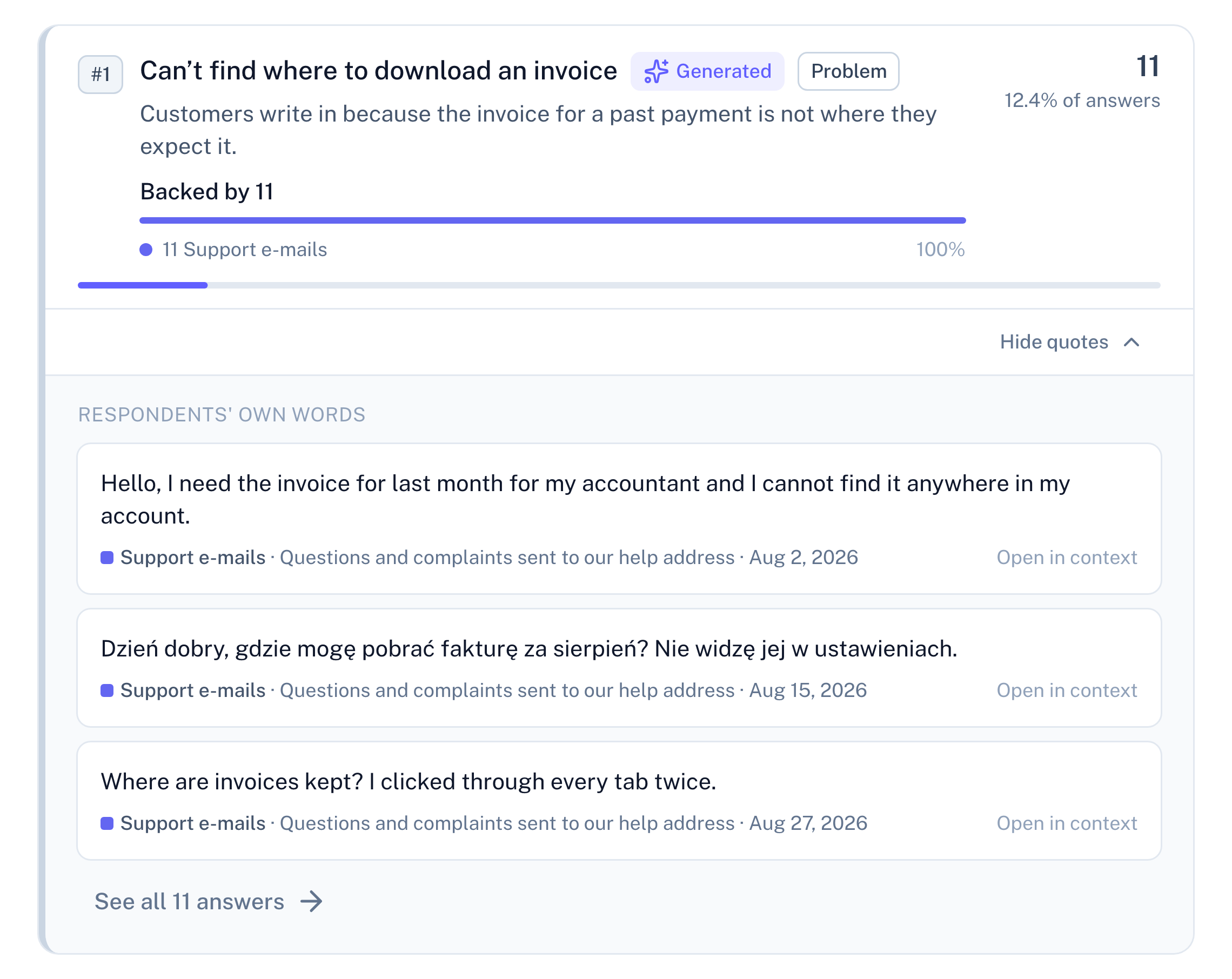
Panel screenshot: the insight "Can’t find where to download an invoice", labelled Generated and Problem, backed by 11 support e-mails, opened into three verbatim quotes with their dates and a link to see all 11 answers

Example data

Fewer than ten messages: a count, not an insight

Each message you paste or send is one complete response. Under ten in a period, RawQuotes shows how many messages you have and how many are missing, links to them, and names nothing.
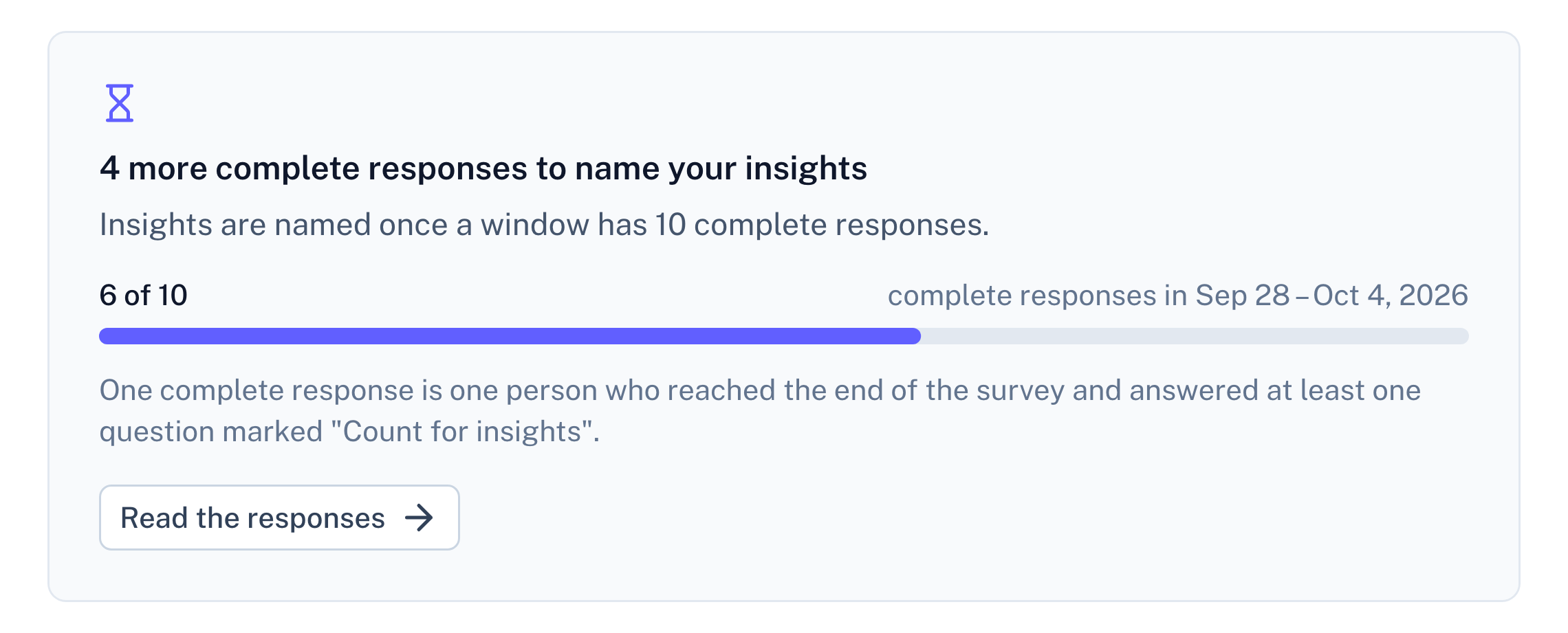
Panel screenshot: a refusal below the threshold of ten complete responses, titled "4 more complete responses to name your insights", with a progress bar at 6 of 10

Example data

Questions about support e-mails

Does RawQuotes connect to Zendesk or Intercom?

No. There is no integration and no preset for a helpdesk export. Paste the messages, or send them through the API from n8n, Zapier, Make or your own code (Basic and Pro).

Can I import a Zendesk CSV export?

It has no message text to read: Zendesk’s CSV export leaves out ticket comments and descriptions. Copy the messages and paste them, or send them through the API.

Are e-mail addresses in the messages sent on?

E-mail addresses, phone numbers, IBANs and similar details are replaced before any text reaches our AI provider. Masking is best-effort and names are not masked, so a message that starts with “Hi Anna” keeps the name.

What about a long e-mail thread?

Paste the customer’s own message rather than the whole thread.

Docs
Paste feedback, step by step
How a paste is split into items, how its date works, and what counts toward your plan.
Read the docs
Pricing
Import and paste are on every plan
Free included. Basic and Pro add the API and recomputing earlier months.
See pricing
Compare
RawQuotes vs ChatGPT
If you paste tickets into a chat today, see what changes.
Compare

Start with last month’s tickets.

Free includes paste. No card required.