Survey MCP server

Surveys your agent can run — and verify.

Your agent creates the survey, gets the link or the embed snippet, adds feedback you already have, and reads insights with the exact quotes they were counted from. Under ten complete responses, it gets a count, not a guess.
https://mcp.rawquotes.io/mcp

Sign in with OAuth, or use an API key. Basic and Pro plans, also in the 14-day trial.

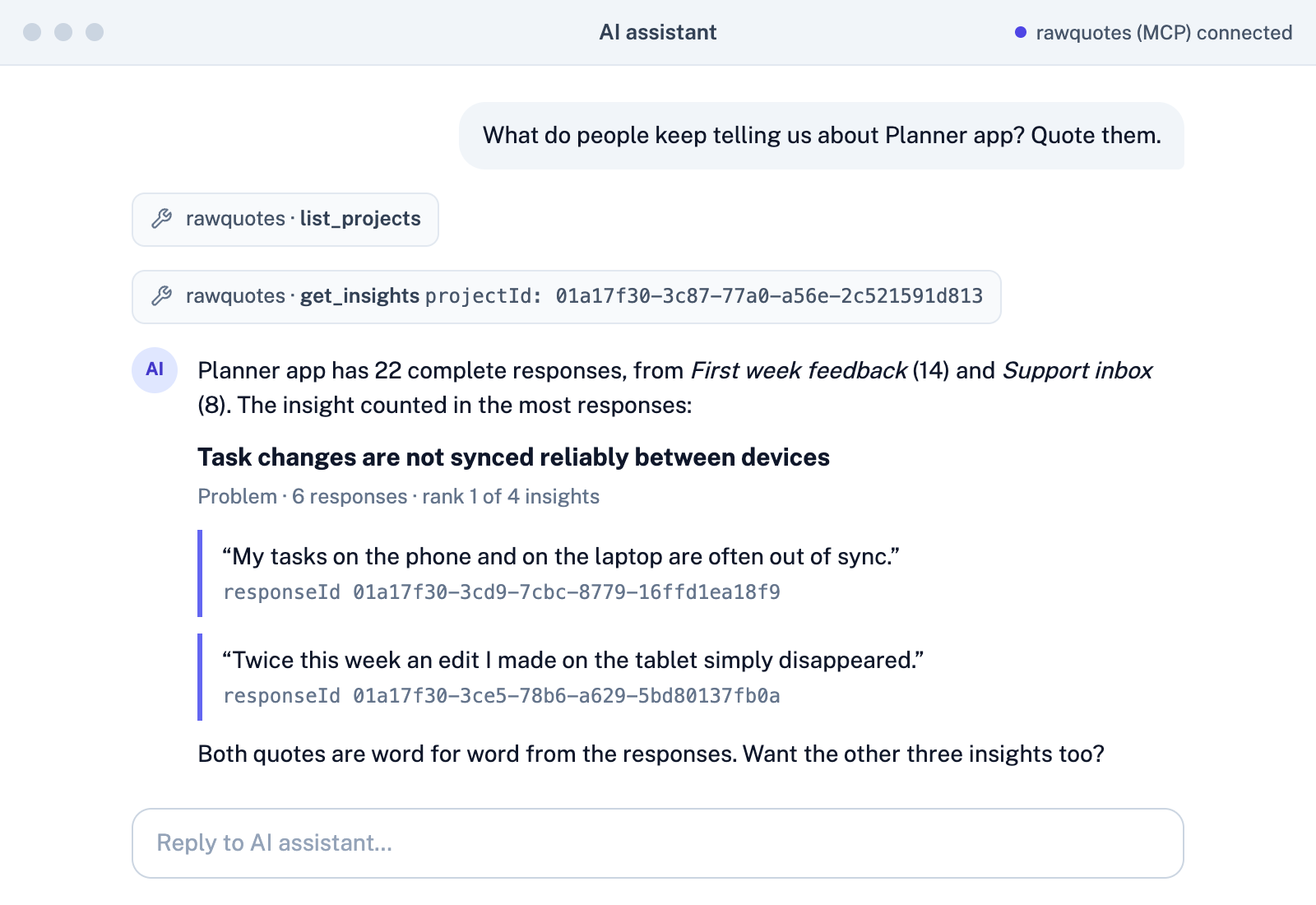
Simulated chat: asked "What do people keep telling us about Planner app? Quote them.", an AI assistant calls list_projects and get_insights, then names the top insight, "Task changes are not synced reliably between devices" (6 responses), with two word-for-word quotes, each followed by its responseId.
Example data. Simulated chat view; the quotes and response IDs come from a real get_insights call. Read the transcript
Connect your agent

Three steps to connect the survey MCP server

Basic and Pro plans, also in the 14-day trial
1

Add the server

In your agent, add a custom connector with the server URL. From a terminal, run:

claude mcp add --transport http --scope user rawquotes https://mcp.rawquotes.io/mcp

A client with a config file needs one entry in mcp.json, in the setup guide.
2

Approve what it may do

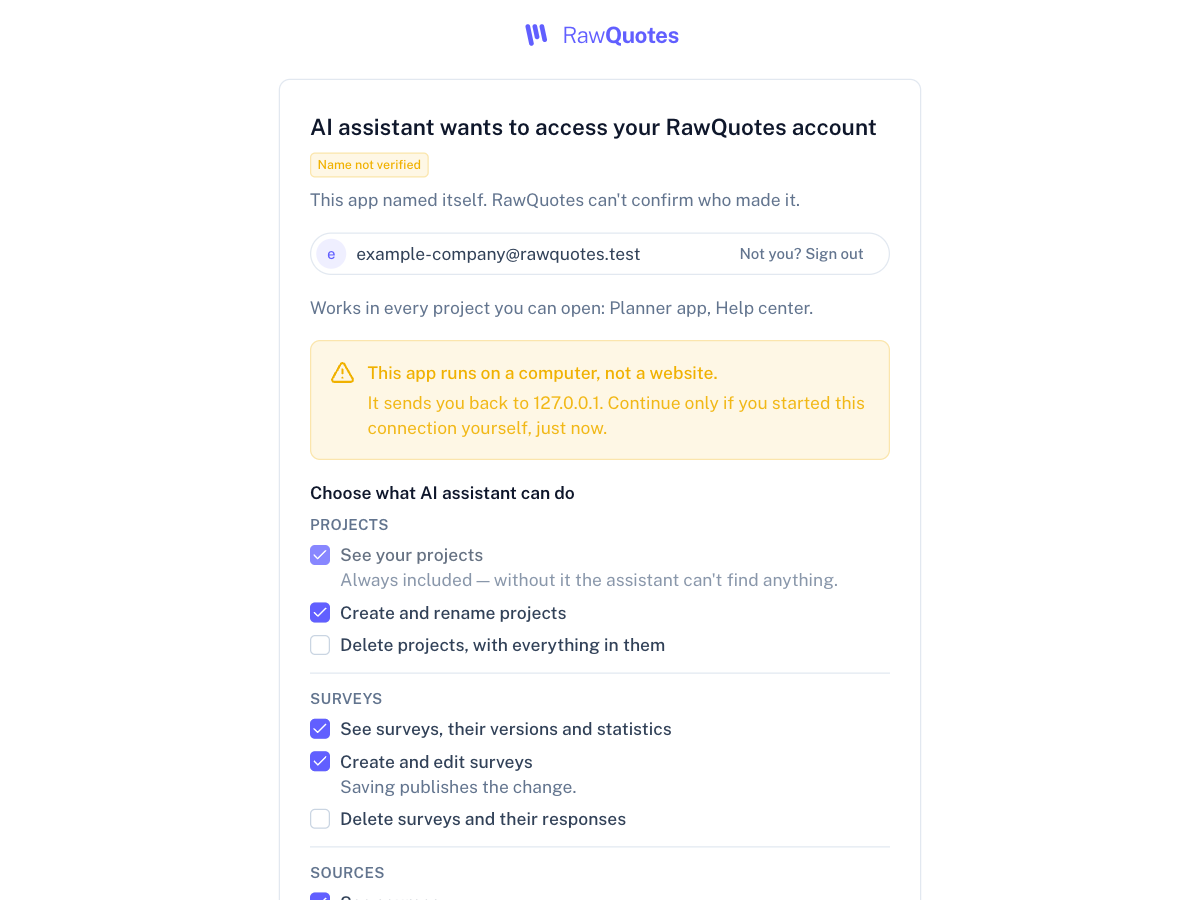
Sign in and choose on the consent screen: read surveys, create them, read responses. Revoke it any time in Settings.

The RawQuotes consent screen: "AI assistant wants to access your RawQuotes account", marked Name not verified, with the signed-in e-mail, the projects it works in, and a list of permissions grouped by Projects, Surveys and Sources, each with its own checkbox; deleting is unchecked.
Example data.
3

Ask the first question

“List my RawQuotes projects, then show the insights for the first one. For each insight, quote one answer word for word with its responseId.”

Under ten complete responses, your agent tells you how many there are and how many are missing.

Every insight comes with its receipts

Your agent can check every quote against the response it came from

Each quote carries the responseId and the position it was matched at. Only the insight's name is generated.
  1. You askYour agent
  2. Connects tomcp.rawquotes.ioonly what you approved
  3. Collectscreate_surveycreate_fill_linkadd_source_items
  4. People answerComplete responsesa survey response, review, e-mail or row counts as one
  5. Readsget_insights

Ten or more complete responses

Insights, each from at least three responses, each with its quotes. The quote is the exact span of the response:

Ordering was easy, but the parcel took nine days and nobody told me it was delayed.

responseId 0192b5e1-…start 53length 29Example data.

Then list_responses returns that response, and the words match.

Fewer than ten

No insights. Your agent gets state: not-enough-data, the count and the threshold, and is told not to work out insights from raw responses itself.

Example data: 6 of 10.

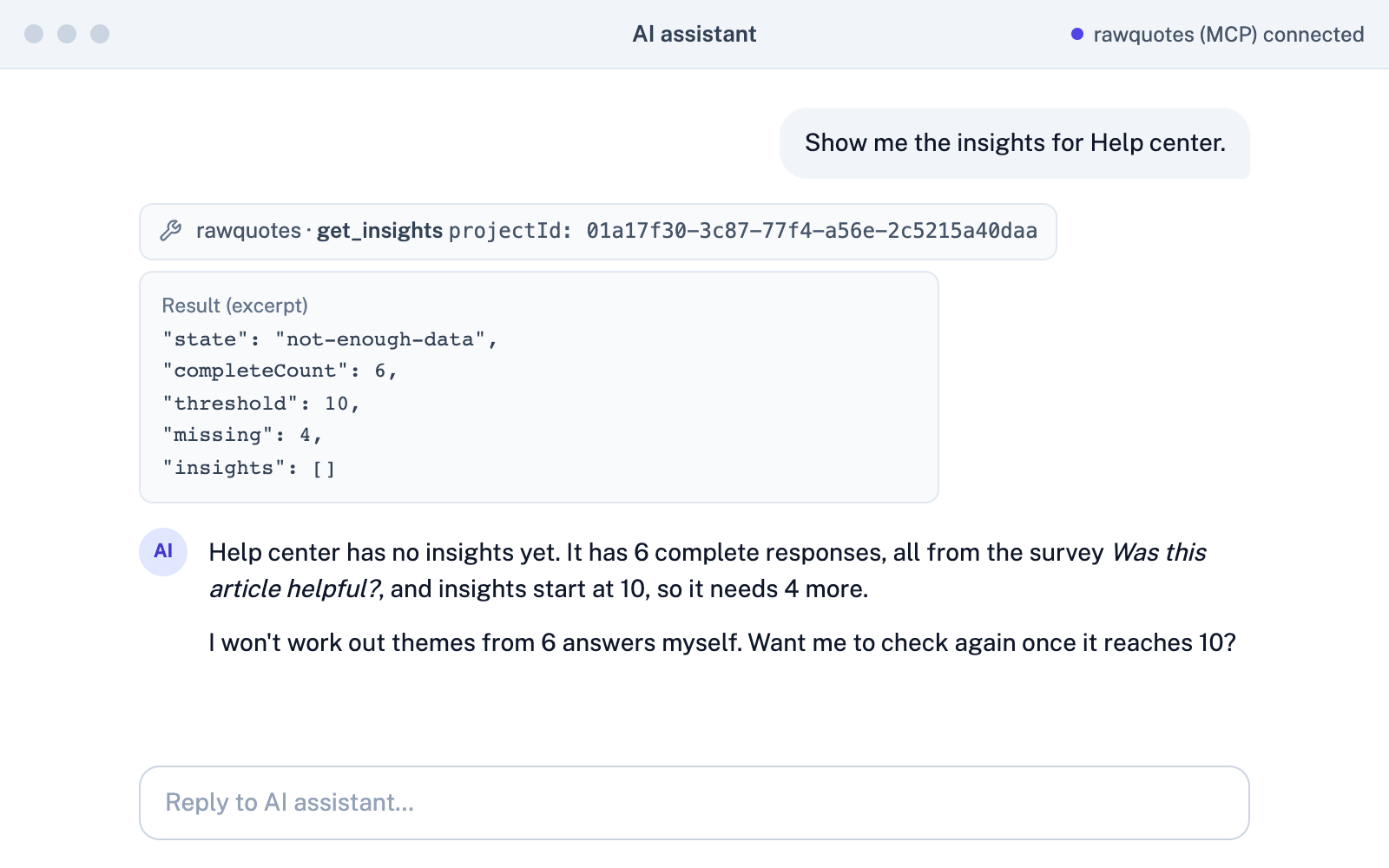
Under ten, it says too few

Your agent won't invent a trend from four answers

Below ten complete responses, your agent gets numbers, not insights.
Simulated chat: asked for the insights of Help center, an AI assistant calls get_insights, which returns state not-enough-data, 6 complete responses, threshold 10, 4 missing and no insights; it replies with those numbers and names no insight.
Example data. Simulated chat view; the quotes and response IDs come from a real get_insights call.
You decide what it sees

Your agent reads responses only if you allow it

Your agent reads responses only if you allow it; if you do, it gets the original text.

Without that permission it works with surveys and counts only. With it, your agent reads what people wrote, as they wrote it, and passes it to the AI provider you use with that agent. There is no tool that deletes anything.

The RawQuotes consent screen: "AI assistant wants to access your RawQuotes account", marked Name not verified, with the signed-in e-mail, the projects it works in, and a list of permissions grouped by Projects, Surveys and Sources, each with its own checkbox; deleting is unchecked.
Example data.

Questions

Which plan includes it?

Basic and Pro, also during the 14-day trial.

Does the agent publish surveys?

Yes. Every save publishes; there are no drafts. Ask it to show you the survey first.

Does the agent see respondents' e-mails?

If you allow it to read responses, yes: it gets the original text, including anything people typed. Without that permission, it gets no response text at all.

Can it answer surveys or make up respondents?

No. There is no tool for submitting a response.

Ask your agent what people keep telling you.

https://mcp.rawquotes.io/mcp