Google reviews

A Google reviews analysis tool that shows the reviews behind every insight

Your Business Profile shows the stars. Why people gave them is in the comments. Import your reviews as a JSON file and RawQuotes names what people keep writing about, with the exact reviews under every insight.

The same few complaints, written a hundred ways

One person says the wait was too long. Another says nobody picked up the phone. A third gives two stars and writes “never again”. You reply to each of them, and nobody counts how many said the same thing.

From your reviews to insights in three steps

1
Get the reviews file
The preset reads a JSON file of Business Profile reviews with the field names Google uses for a review: reviewer.displayName, starRating, comment and createTime.
2
Upload the file
The Google reviews preset recognises the file by reviewer.displayName, starRating and createTime, and takes the text from comment. A file that keeps the list under a reviews key is read the same as a bare list.
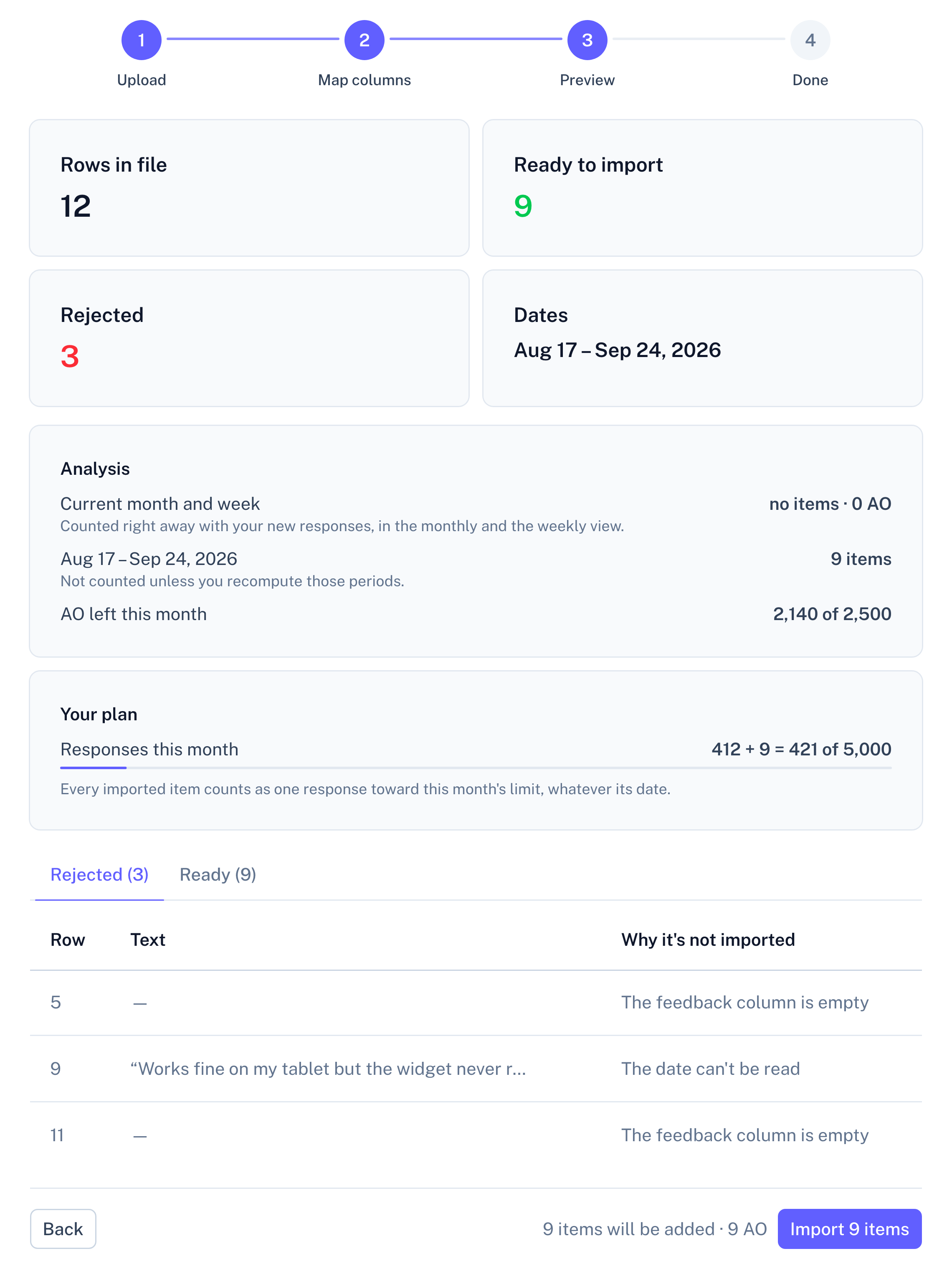
Panel screenshot of the file import preview, step 3 of 4 (Preview): cards showing 12 rows in file, 9 ready to import, 3 rejected and the date range Aug 17 to Sep 24, 2026; an Analysis block and a Your plan block with usage bars; tabs Rejected (3) and Ready (9) with the rejected rows and the reason each is not imported; a Back button and an Import 9 items button

Example data

3
Read what repeats
A quote is the review’s comment, dated by createTime, the moment Google says the review was written.

What the Google reviews preset reads

The file is recognised by its field names. Two fields are used; the rest is left out.
Column in the exportWhat RawQuotes does with it
commentThe text insights are counted from and quoted word for word.
createTimeThe date. It decides which week and month the item is counted in.
reviewer.displayName, starRatingOnly used to recognise the export.
Every other columnLeft out, including the reviewer’s photo, the time a review was edited and your replies.

A review with a rating and no comment is skipped as empty: there is nothing to quote. An edited review is still dated by createTime, so it stays in the month it was first written.

What your Business Profile reviews turn into

A short list of sentences, each naming something customers keep raising, with the number of reviews behind it. Open one and you read those comments word for word, with the date each review was written.

From here on, every source works the same. All sources in a project feed one set of insights, and each insight shows how many items came from each one. The list under an insight is exactly as long as its count, a month can be compared with the one before, and only the insight’s name and description are written by the model, labelled as generated. How the analysis works
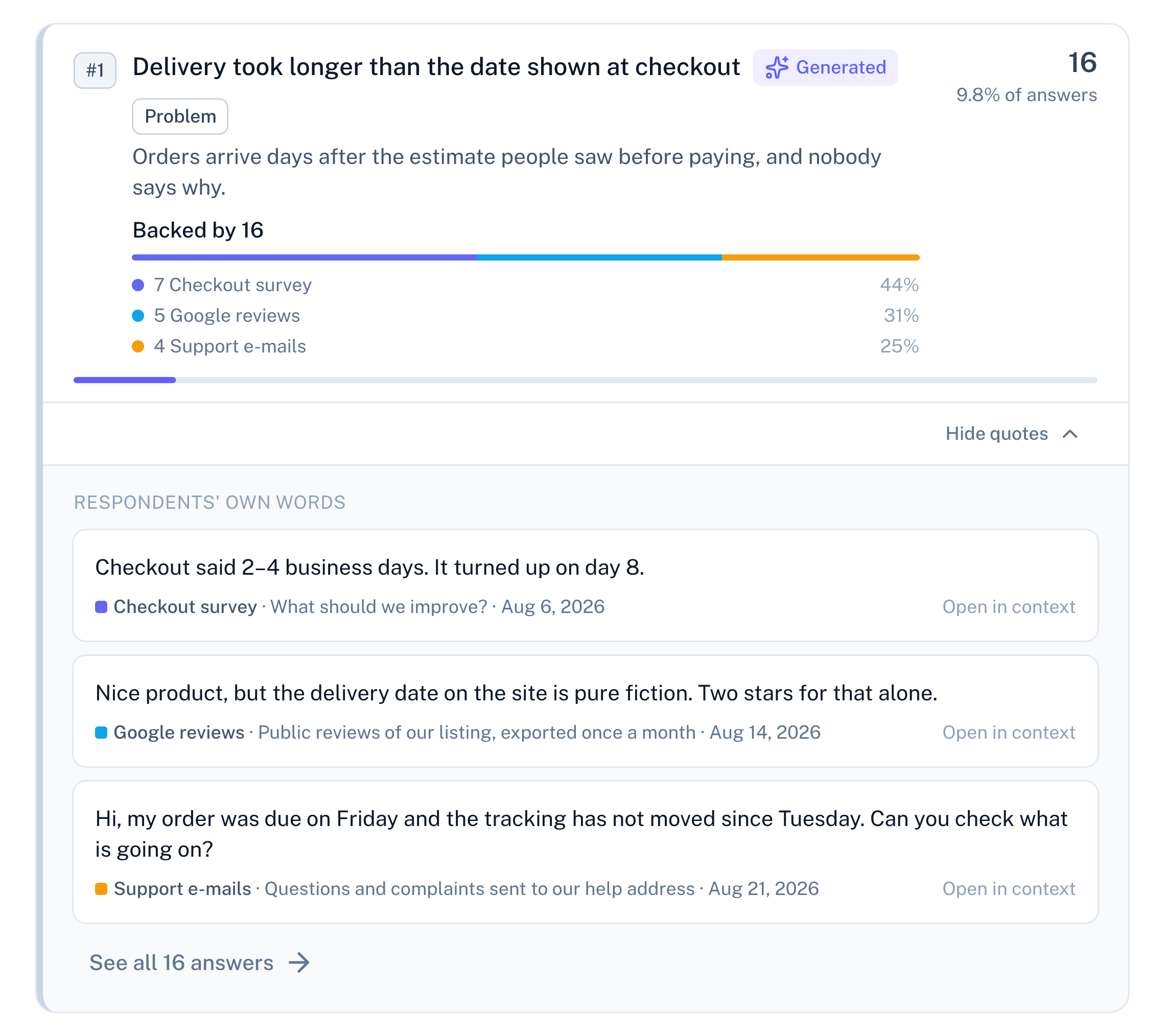
Panel screenshot: the insight "Delivery took longer than the date shown at checkout", labelled Generated and Problem, backed by 16 items: 7 from a checkout survey, 5 Google reviews and 4 support e-mails. It is opened into three verbatim quotes, one from each source. Under each quote are its source, the survey question it answered ("What should we improve?") or the source's description, and its date, followed by a link to see all 16 answers

Example data

Fewer than ten comments: a count instead of an insight

A review counts as a complete response only when it has a comment. Below ten in a period, RawQuotes names nothing and shows how many you have, how many are missing, and a link to the reviews themselves.
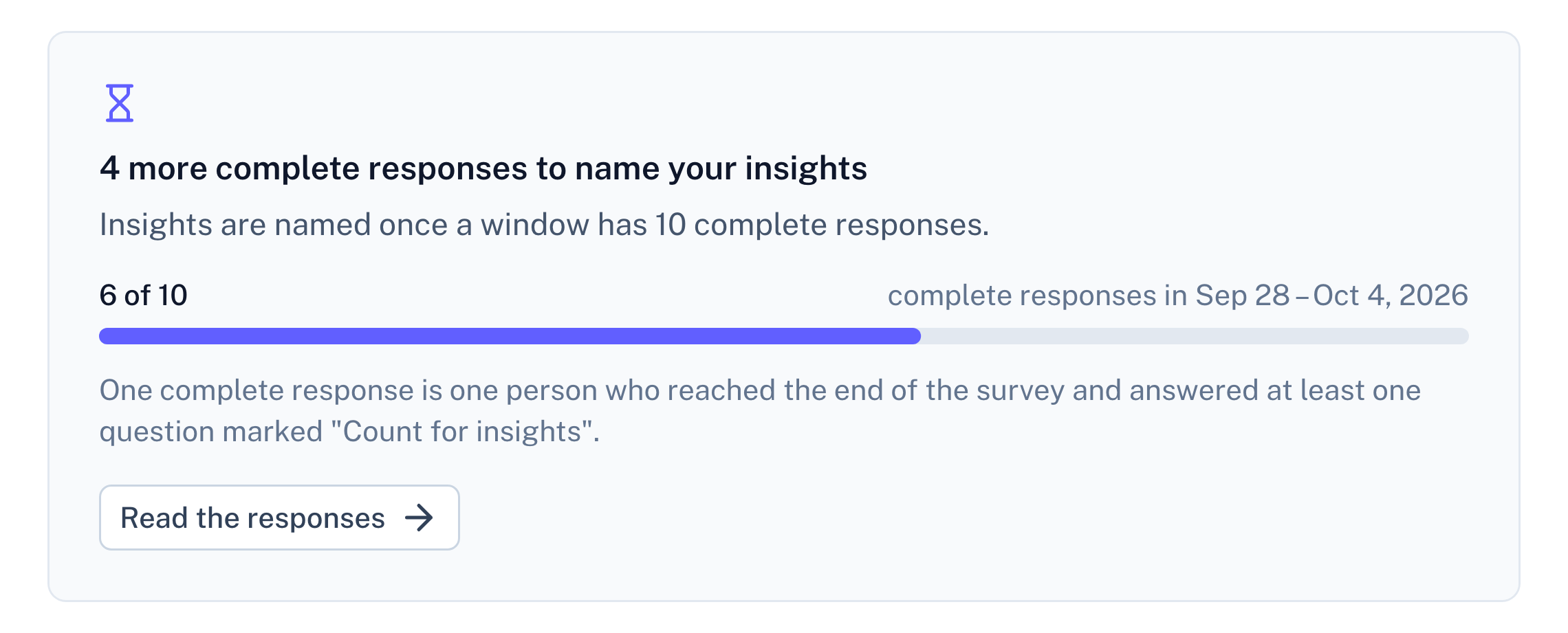
Panel screenshot: a refusal below the threshold of ten complete responses, titled "4 more complete responses to name your insights", with a progress bar at 6 of 10

Example data

Questions about Google reviews

Does RawQuotes connect to my Business Profile?

No. You upload a file of your reviews, and RawQuotes never signs in to Google on your behalf.

Is the star rating used?

No. starRating only helps recognise the file. What is read is the comment and createTime.

Are my replies to reviews imported?

No. Only the review’s own comment becomes an item. Your reply is left out with the other fields.

Are reviewer names shown next to the quotes?

No. reviewer.displayName only helps recognise the file and is not imported. A quote carries the comment and its date.

Docs
Import a file, step by step
Which files are read, how dates work, and why a row is skipped.
Read the docs
Pricing
Import and paste are on every plan
Free included. Basic and Pro add the API and recomputing earlier months.
See pricing
Compare
RawQuotes vs ChatGPT
Pasting reviews into a chat to sum them up? See what changes.
Compare

Start with the reviews you already have.

Free includes file import. No card required.