A summary written by a model reads well whether it is right or not. A clean sentence over a column of free-text answers looks the same when it describes many people as when it stretches two of them. The only way to tell is to go back to what people actually wrote. This post is a method for doing that with any tool, and then how RawQuotes is built around it.
Five checks that work in any tool
You need two things: the summary, and the raw answers it was made from, in a form you can search.
1. Find each quote in the raw answers
Search for the exact words. If the quote is not there character for character, something rewrote it, and you can’t tell how much of the meaning moved with the words. A shortened or tidied-up quote is not evidence of anything.
2. Read the whole answer around the quote
Open the full reply the quote came from. A clause taken out of a longer answer can mean something different from the answer as a whole, and the summary will not tell you that.
3. Count the answers behind the insight yourself
If the summary gives a count, ask for the list behind it and count it. If there is no list, the count is a claim you can’t check. Then read the list: do the answers say the same thing, or do they only share a word?
4. Look at what did not fit
A summary shows what it grouped. The answers it left aside are part of the picture too. Find out how many there were and read some of them, so you know whether anything got lost.
5. Check how many answers there were to begin with
An insight named from a handful of answers looks exactly like one named from hundreds. Before you trust any of it, check the total. We wrote separately about why we name nothing under ten complete responses.
Why a real quote is not the whole check
A quote you can find in the raw answers proves the words exist. It doesn’t prove that the insight above it is a fair name for them, or that the count is right. That is why checks 3 and 4 matter as much as the first one: a quote shows one answer, the list shows all of them.
How RawQuotes keeps these checks short
- Every quote is matched word for word before it is saved. After the model picks a quote, RawQuotes searches the answer it is attributed to for that exact text. A quote that is not there character for character is thrown away, not corrected.
- Every quote opens the whole answer. Each quote shows its source, the question it answered and its date. Click it and you see the full response, with the quoted part marked.
- The list is as long as the number. “See all answers” under an insight lists every answer counted into it. The count and the list come from one definition.
- The insight’s name and its short description are the only text nobody wrote to you. The panel says so, and a generated name is labelled Generated.
- What did not fit is counted. Next to the insights you see how many answers did not fit a repeating insight.
- Under ten complete responses, nothing is named. You get the count and a link to the raw responses instead.
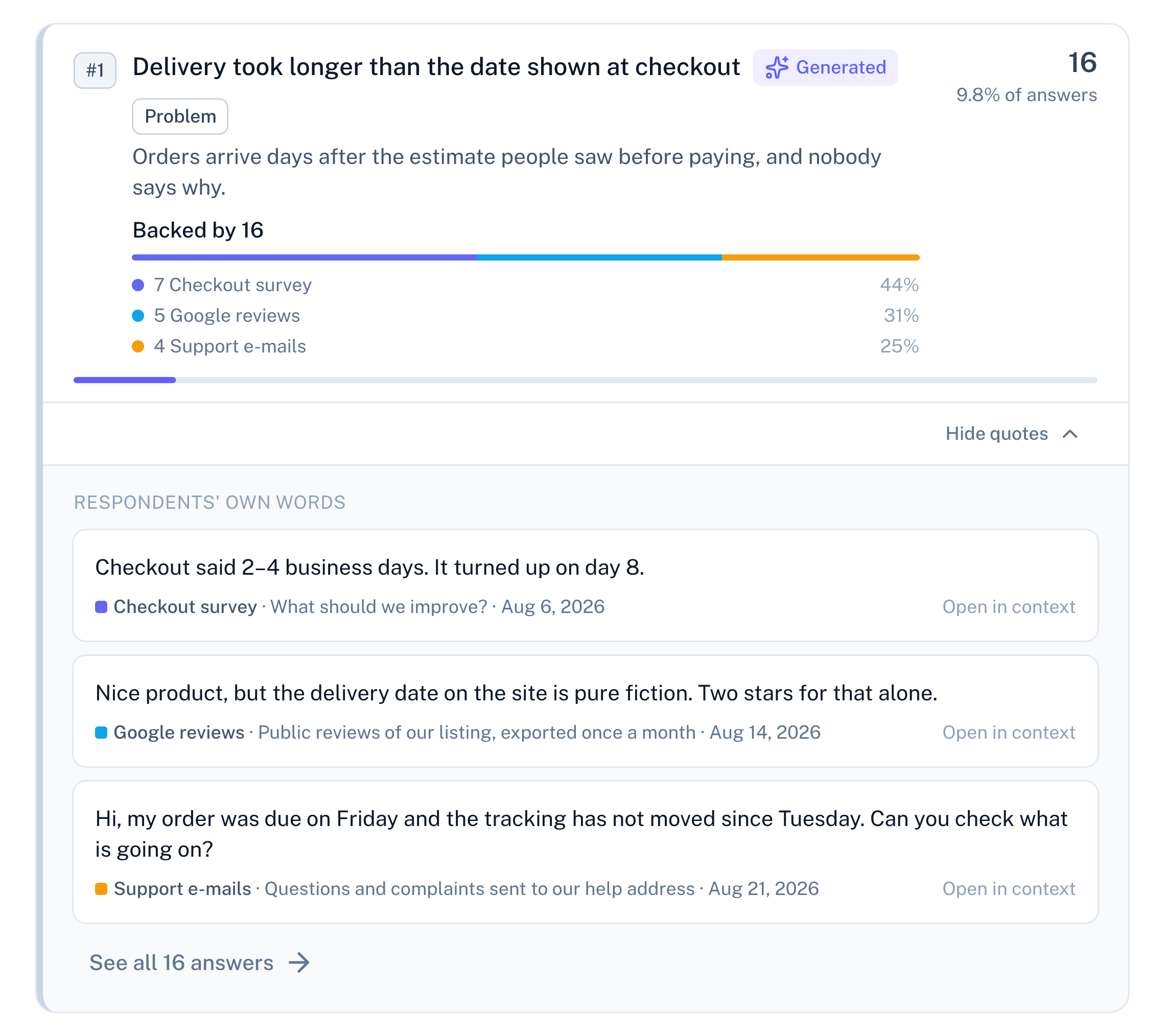
Example data
The same check outside the panel
Each quote carries a responseId and an answerId, plus start and length: where the quoted text sits inside the answer. That is enough to find the exact characters in the original response.
Through MCP, an AI assistant you connect reads insights with get_insights, where every quote carries its responseId, and reads the responses themselves, as written, with list_responses. When a project is under ten complete responses, the tool tells the assistant to report how many there are and how many are needed, not to work out insights from the raw responses on its own.
With an API key, GET /api/v1/responses returns the raw responses with every answer, and its q parameter searches the open-answer text, so a script of your own can look up any quote.
What these checks don’t tell you
They tell you a quote is real and the count matches the list. They don’t tell you the grouping is the only sensible one: two people can read the same answers and draw the lines in different places. For that there is no shortcut. Open the list and read it.