We make RawQuotes, so it is listed first. Everything else comes from each vendor's own pages, checked on November 11, 2026.
The short answer
If you are looking for an alternative to Thematic for grouping survey answers, reviews or support text into themes, these five tools read written feedback and group it for you. RawQuotes reads tens or hundreds of answers a month and opens every count into the quotes behind it. The table shows what each tool reads, what it costs and whether it links its results to source quotes.
| Tool | Built for | Feedback it reads | Starting price as listed (date) | Free plan or trial | Links insights to source quotes |
|---|---|---|---|---|---|
| RawQuotes | Small teams reading tens or hundreds of answers a month | Survey answers, CSV, Excel and JSON exports, pasted text, the API | Free; Basic $29/month (Nov 11, 2026) | Free plan; 14-day trial on Basic | Yes: every insight opens into the answers it was counted from |
| Caplena | Market research, CX and EX teams coding open-ended answers | Excel, CSV and SPSS files; JSON through the API; online reviews; survey tools through integrations | No public price (Book a call), checked November 11, 2026 | Not stated | Highlights "the phrase that justified each assignment" |
| Kimola | Turning reviews, surveys and support conversations into product research | Excel, CSV and TSV files, Google Sheets; reviews from Amazon, Google Play, the App Store, Trustpilot, Tripadvisor and Google Business | Basic: $49/month, billed monthly (Nov 11, 2026) | Free Starter plan | Not stated |
| Chattermill | CX, insights, product and voice of customer teams | Surveys, online reviews, social media, support conversations and voice calls | No public price (Book a demo), checked November 11, 2026 | 2-minute interactive demo; trial not stated | Yes: "links every insight to the real customer quotes behind it" |
| Enterpret | Product, voice of customer and CX teams | Support tickets, sales calls, app reviews, review sites, community threads and product analytics; anything else through the API | No public price (Book a demo), checked November 11, 2026 | A 5-minute look at the platform; trial not stated | Yes: "answers traced to real conversations" |
What Thematic does
Thematic calls itself "the customer intelligence layer for enterprise CX" (getthematic.com). It builds themes from customer comments without a predefined list, and in its words, "Every theme traces back to the exact words that created it." Of its theme model, it says: "You can see inside it, adjust it, and steer it." A Scoring Agent "generates predicted NPS, churn propensity, and effort scores from unstructured feedback".
Feedback comes in through one-click integrations, CSV uploads and the API, from sources such as Zendesk, Intercom, Gong, Trustpilot, app stores and your data warehouse. According to Thematic, "The insights team typically owns the platform and the theme model", and product, CX, operations and strategy teams each get the view that matters to them.
Foundation costs "$25,000 / year" for "25,000 comments a year, up to 3 datasets", and Enterprise has "Custom pricing" (plan and pricing, checked November 11, 2026). In place of a free trial, Thematic offers "custom demos on your data or a comprehensive paid pilot". We compare the two in more detail in RawQuotes vs Thematic, side by side.
If you came to Thematic with a spreadsheet of comments and one question, "what do people bring up most?", every tool below answers it.
How we chose the tools
We looked for tools that people searching for a Thematic alternative can use for the same job: reading written feedback they already have and grouping it into themes or topics they can count and check.
- Each tool reads text you bring, such as survey answers, reviews or support messages, and groups it.
- Each one publishes its price, or says plainly that pricing comes through a call or a demo.
- We read only each vendor's own pages. No review sites, no directory prices.
- Every price is copied word for word from the vendor's pricing page, with its address and the date we read it.
We left out tools that do a different job: interview repositories, feature voting boards, bug reporting and in-app survey builders. We have not measured how well any of these tools groups text, ours included, so nothing on this page is a claim about accuracy.
1. RawQuotes
RawQuotes reads written feedback in one place and groups the repeats into named insights. Each insight opens into the exact words it was counted from. You bring the text as a CSV, Excel or JSON export, paste it in, send it through the API (Basic and Pro), or collect it with a short survey on any page where you can add one script tag. Exports from Google Forms, Typeform, Tally, Google Play Console and Google reviews (from Google Takeout) have a preset, so the columns are matched for you. Any other spreadsheet works as CSV or Excel, and so does a help desk export.
For a Thematic user, the main difference is scale: RawQuotes is made for tens or hundreds of answers a month, at a published monthly price. You upload the file and pick the column with the text. Before anything is saved, you see how many rows were read, which ones were rejected and why. Then RawQuotes names the groups. Each insight shows how many responses back it and what share of answers that is, and it opens into the answers behind it, word for word.
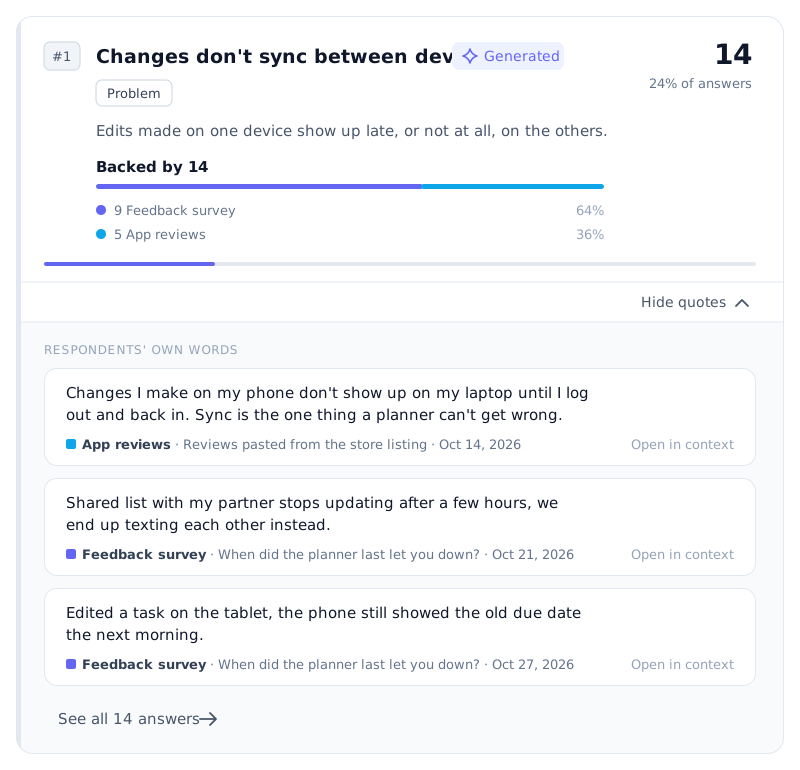
Illustration with example data.
What happens between the file and the insights:
- Import. The text comes in from a survey, a file, a paste or the API, and is read together under the same rules.
- Masking. Before any text reaches our AI provider, e-mail addresses, phone numbers, IBANs and similar details are replaced with a placeholder. Masking is best-effort and names are not masked. The quotes you read always come from the original text.
- Grouping. Answers that say the same thing are grouped and named in one sentence: a problem, a piece of praise or a reason.
- The ten-response check. RawQuotes names an insight once a period has ten complete responses. Before that, you see how many you have, how many it needs and how many are missing. One imported review, e-mail or row counts as one response.
- Insights with quotes. Each insight opens into at least three of the answers behind it, unshortened.
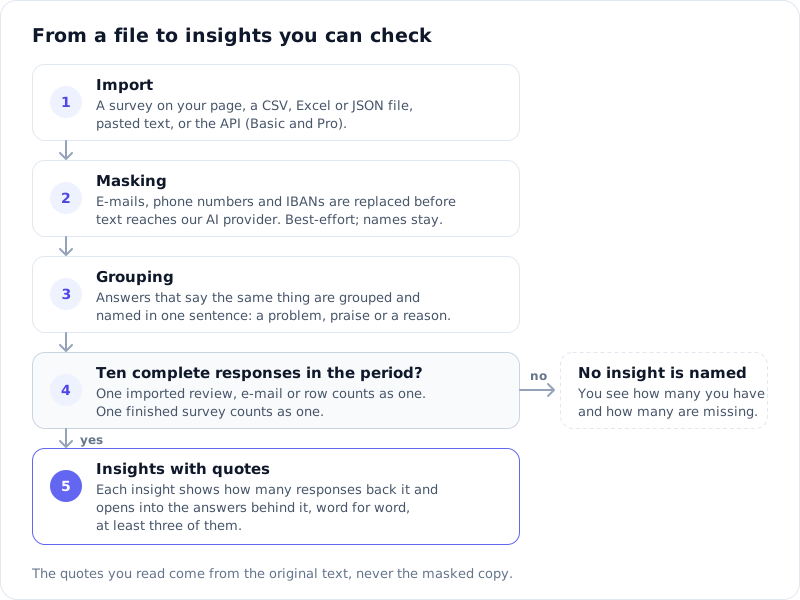
Diagram
If a recalculation fails, RawQuotes says so and shows the last good result with its date. You can also compare two periods, a week or a month against an earlier one: every insight shows its share of answers in both and how many percentage points it moved, and a problem that grows is marked red.
Who it fits: a small team with tens or hundreds of answers a month that wants to read the evidence before acting on a number. It also suits anyone who wants to start free and pay by the month at a published price.
What you can rely on: RawQuotes names an insight only from ten complete responses in a period. With fewer, you get the count and the raw answers, so a small file is shown as it is. Every insight opens into its quotes, so you can check each count against the words behind it.
Price: Free; Basic $29/month; Pro $69/month. Prices exclude VAT and other sales taxes. Basic comes with a 14-day trial. The limits for each plan are on the pricing page.
2. Caplena
Who it fits: Caplena calls itself "Text coding for Market Research, CX and EX teams" (caplena.com). Its plans are Team, "For small brand-side teams", Enterprise, "For brand-side organizations", and Agency, "For market research agencies."
Price: No public price (Book a call), checked November 11, 2026. The pricing page lists Team, Enterprise and Agency plans, each with "Book a call".
Strengths: Caplena works with a codebook you can shape. "You can add new topics with ease, change hierarchy, import your existing codebook, start topic discovery from scratch", and keep an audit trail. You steer it by editing topic descriptions in plain language and re-running the AI on the affected responses. For each topic it assigns, "it highlights the phrase that justified each assignment and shows how confident it is." It reads "Excel (xls, xlsx), CSV, and SPSS (sav) files", takes JSON through the API, and can gather online reviews from supported sites.
3. Kimola
Who it fits: teams that want to "Turn reviews, surveys and support conversations into product research", in Kimola's words, including feedback in more than one language.
Price: Basic: $49/month, billed monthly (kimola.com/pricing), checked November 11, 2026. Standard is $179/month, Business $359/month and Enterprise custom. The free Starter plan includes 150 queries a month, where "Each analyzed data row with up to 500 characters counts as one query."
Strengths: Kimola lists "30+ Language Support" on its pricing page. You can "Import customer feedback in Excel, CSV, or TSV formats" or from Google Sheets (custom data sources), and sort it with pretrained models or custom AI models of your own, which start on the Basic plan. It can also collect reviews from Amazon, Google Play, the App Store, Trustpilot, Tripadvisor and Google Business, so you may not need to export them first. On paid plans, Intercom and Zendesk can be connected too.
4. Chattermill
Who it fits: Chattermill calls itself "The AI Voice of Customer & Feedback Analysis Platform" and says it "helps CX, Insights, Product and VOC teams unify and analyze feedback across every channel" (chattermill.com).
Price: No public price (Book a demo), checked November 11, 2026. The pricing address leads to the demo page. Chattermill says "we do not charge a per user fee - you can add as many users as you need", and it offers a 2-minute interactive demo.
Strengths: Chattermill reads "surveys, online reviews, social media, support conversations, and voice calls", with "65+ native integrations and an MCP server", Zendesk, Intercom, Qualtrics and Trustpilot among them. In its words, it "links every insight to the real customer quotes behind it", and its agent, Lyra, gives answers "backed by real customer quotes". You can also "Turn top issues into Jira tickets with the customer quotes attached."
5. Enterpret
Who it fits: Enterpret describes itself as "Customer context for AI-native product teams" (enterpret.com), with solutions for product management, voice of customer and customer experience.
Price: No public price (Book a demo), checked November 11, 2026. The site also offers a short look at the product: "See the Enterpret Platform in 5 mins", with "No commitment required."
Strengths: Enterpret reads feedback from "Support platforms like Zendesk and Intercom, call recording tools like Gong, app stores, review sites", plus social and community channels and product analytics. "Anything else can come through the API." Results go to Slack, Jira, Linear, Salesforce, HubSpot and Notion, and AI agents such as Claude, Cursor, Codex and ChatGPT can query it over MCP. In its words, you "Get answers traced to real conversations", and "Every issue ships with the customer context attached."
FAQ
Do these tools show the comments behind each theme?
Thematic says every theme traces back to the exact words that created it. Chattermill links every insight to the customer quotes behind it, Enterpret traces its answers to real conversations, and Caplena highlights the phrase behind each topic it assigns. In RawQuotes, each insight opens into at least three of the answers behind it, unshortened.
Can I move my Thematic data?
If you have the original comments as a CSV or Excel file, any tool here that accepts file uploads can take it. In RawQuotes you pick the column with the text. Your Thematic themes are not used to group it.
Can I bring in text from my help desk?
Thematic, Chattermill, Enterpret and Kimola list Zendesk and Intercom among their connections. RawQuotes takes help desk text as an exported file, as pasted text or through the API.
How many answers do I need before the results mean anything?
In RawQuotes, ten complete responses in a period before any insight is named. We explain why in how many survey responses you need.
Which tools have a free plan?
RawQuotes has a free plan, and Basic has a 14-day trial. Kimola has a free Starter plan. Chattermill offers a 2-minute interactive demo, Enterpret a 5-minute look at its platform, and Thematic a custom demo on your data or a paid pilot. Caplena, free plan or trial: not stated on its pricing page, checked November 11, 2026.
Prices last checked
Prices last checked November 11, 2026. We re-read every vendor's pricing page each quarter, or sooner when a vendor changes its plans, and the date above only moves after a real re-check. If you spot a price that is out of date, write to us.
If you want to try RawQuotes on your own export, see the plans.