When one open-ended answer fits two categories, code it under both. The second code is fine; double counting comes from what you count afterwards. Count each category in people, so one person counts once however often they said it, and divide by the number of people who answered. The shares will no longer add up to 100%, and that is expected: one person can sit in several categories.
Why the numbers go wrong
Three habits cause most of it, and they usually come together.
The first is forcing one category per answer. "Shipping was €7.90, which I only saw at checkout, and the parcel took nine days" is a complaint about price and a complaint about speed. Keep one code and the other complaint drops out of the report. Which one survives depends on who coded the row that day.
The second is counting mentions. A customer who brings up the shipping cost in two questions is two mentions and one customer. People who write long answers end up weighing more than people who write one line, and your top category is partly a measure of who likes to type.
The third is dividing by mentions. If the codes add up to 35 and you divide every category by 35, the shares sum to 100% and the chart looks tidy. They are shares of codes, a number nobody asked about, and every category shrinks a little whenever someone writes a longer answer.
Surveys with several open questions add a fourth: pasting all of a person's answers into one text before coding. You can't tell any more which question a category came from, and the same point made in two questions looks like a longer answer to one.
The method, step by step
1. Keep one row per person and one column per question
Give every response an ID before you read anything. Keep each open question in its own column. If you were handed a sheet where the answers were already merged, go back to the raw export. It takes less time than untangling the merge later. The ID habit is the same one that makes analyzing answers in Google Sheets with ChatGPT checkable.
2. Code sentences, and keep the sentence
Make a second sheet with one row per code: response ID, question, the sentence that earned the code, and the code. An answer that fits two categories becomes two rows. A person who makes the same point in two questions also gets two rows, both with the same ID, and that is what lets you count them once in the next step.
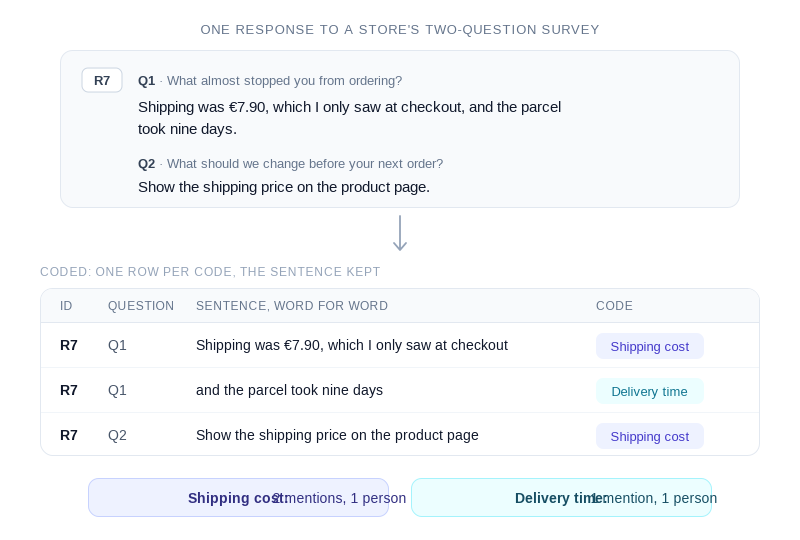
Diagram with example data.
3. Count people, not rows
For each category, count the distinct response IDs. In Google Sheets, with IDs in column A and codes in column D, that is =COUNTUNIQUE(FILTER(A:A, D:D="Shipping cost")). In a pivot table, summarize the ID column by COUNTUNIQUE in Sheets, or by Distinct Count in Excel (it needs the data model box ticked). You can keep the plain row count next to it to see who repeated themselves, as long as the column says "mentions".
4. Divide by the people who answered
The denominator is the number of people who answered the questions you coded. People whose answer got no code stay in it; people who skipped the questions stay out. Write the denominator next to every share, "12 of 40 people", so nobody has to guess what the percentage is of.
5. Build bigger groups from people, not sums
When "Shipping cost" and "Delivery time" roll up into "Delivery", count the people who have either code. Twelve plus eight is twenty. If four of them said both, Delivery is sixteen people, 40% of forty, where adding the two rows would have said 50%.
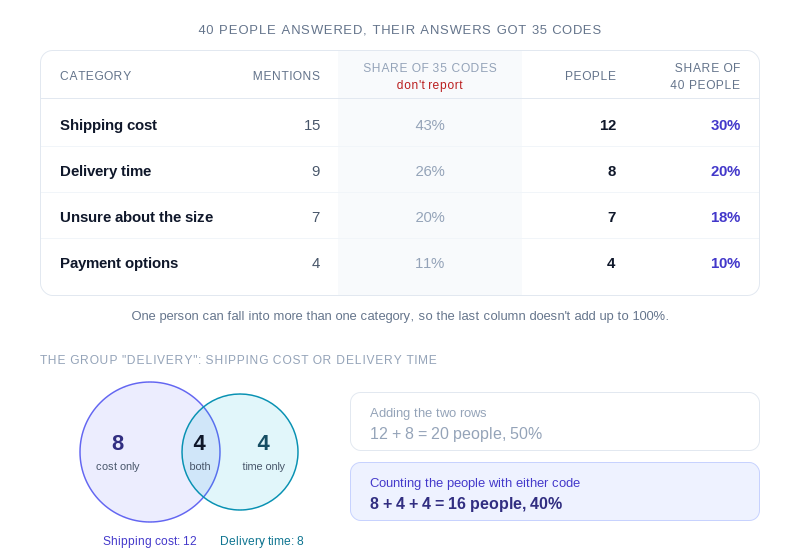
Diagram with example data.
6. Put one line under the table
"One person can fall into more than one category, so the shares don't add up to 100%." It saves the meeting where someone adds up the column and asks what went wrong.
Doing it in RawQuotes
RawQuotes groups the answers into insights itself, and it counts people the way steps 2 and 3 do. An answer that makes two different points can be placed under two insights, and it counts under both. Inside one insight a person counts once: if someone mentions the shipping cost in two questions of the same survey, that insight still counts one person.
The answers stay attached to their questions. Every quote under an insight shows the question it answered and the date, so when two questions feed one insight you can see which one said what, without keeping the columns apart by hand.
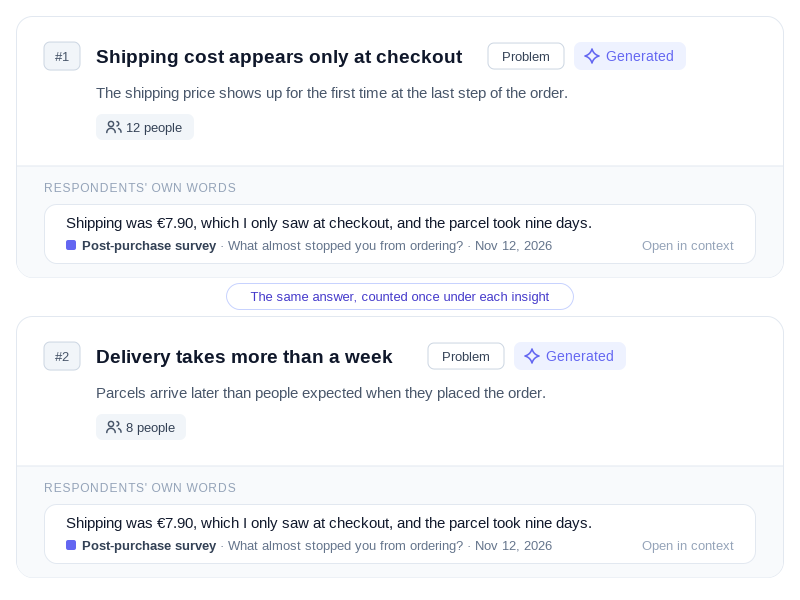
Illustration with example data.
Because one person can sit under several insights, the insights' numbers add up to more than the number of responses. Read each one on its own. When a period has fewer than ten complete responses, RawQuotes names no insight at all; it shows how many responses there are and lets you read them.
Where this method stops
Overlap tells you something about your categories. If two codes nearly always come together, they may be one category under two names, and merging them before you count gives a cleaner number. If one code catches half of all answers, it is probably too broad to act on.
Counting people treats a passing mention and a long complaint the same way. Mentions per person can show how strongly people feel about something, but report that as its own number, with its own label.
And coding is judgment. Two people coding the same answers will disagree on some rows. The sheet with the sentences is where you find those rows and settle them, which is one more reason to keep it.
To have the grouping and counting done on your own survey answers, see the plans.