A pain comes with a moment when it happened and a cost, and often with something the person now does to get around it. A wish names a feature and usually has none of those. So ask about the last time something went wrong, not about what people would like. Read each answer for those three marks before you file it under a label, and count the people who wrote it, not how many times it was said.
Why the two get mixed up
People describe solutions because solutions are easy to name. Someone who has used an AI chat in another product will ask for one in yours. The request tells you what they have seen elsewhere, not what slowed them down in your product. Sometimes a real pain sits under the wish. "Please add a home screen widget" can mean "I keep missing things because I forget to open the app". The only ways to find out are reading what else they wrote and asking them.
Sorting makes it worse. A request filed under "feature request: widget" loses the sentence around it, and that sentence was the evidence. The same pile can hold a passing idea and a missed appointment, and on a tally they weigh the same.
Repetition misleads too. One customer who asks five times looks like five customers on a count of mentions, and a loud wish can push a quiet pain off the list.
The method, step by step
1. Ask about the last time
"What feature would you like?" invites wishes. "When did the app last let you down, and what did you do then?" asks for a moment and a workaround in one question. Some answers will still be wishes, but now you can see that they are.
2. Read each answer for three marks
- A moment: a specific time or situation, not "always" or "in general".
- A cost: something the person lost: time, an order, an appointment, money.
- A workaround: what they do instead: a spreadsheet, a second app, logging out and back in, texting someone.
If an answer has two or three marks, treat it as a pain. If it names a feature and has none, it is a wish for now. If you can reach that person, ask them the question from step 1.
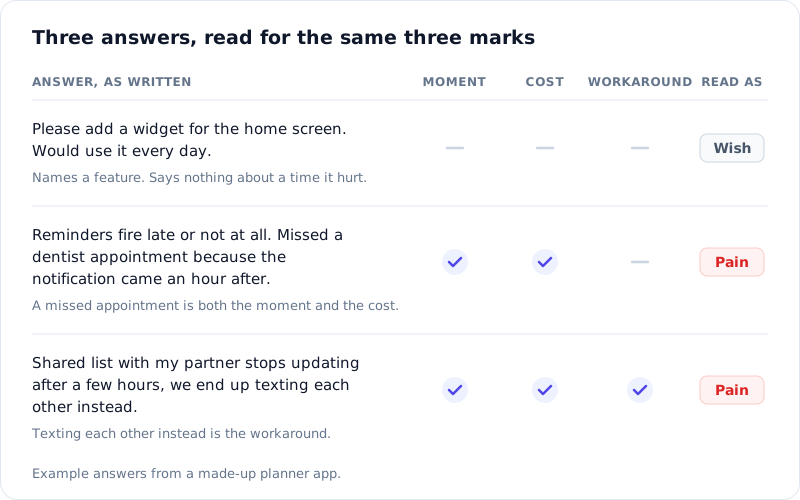
Of the three, the workaround says the most. It shows the person is already paying for the problem, every time it happens. A yes to "would you use this?" costs the person nothing.
3. Read the words before the label
Do it before you group anything, and again after. A group called "sync" can hold three pains and two wishes. Its name sums the group up, and the answers inside are the evidence.
4. Count people, not mentions
Ten requests from one customer are still one customer. Note who said it, and count each person once.
5. See whether it comes back
A real problem that nobody has fixed keeps turning up in the next month's answers, in other people's words. A one-off idea often doesn't. Compare two periods before you give anything a slot on the roadmap.
Doing it in RawQuotes
RawQuotes won't tell you whether an answer is a pain or a wish. It groups feedback into named insights and opens each insight into the exact words it was counted from. Those words are where you look for the three marks.
Start by getting the answers in. Put a survey with a step 1 question on any page where you can add one script tag, your web app included, or send its link by e-mail. Feedback you already have, like support e-mails or app reviews, can be pasted in or imported from a file.
Then open an insight. It shows how many responses back it and opens into quotes, word for word, each with its source, the question it answered and its date. Read them for the marks. "See all 14 answers" opens every answer behind the count, and that list is where you do step 4. It's the same habit as checking an AI summary against the raw answers, aimed at a different question.
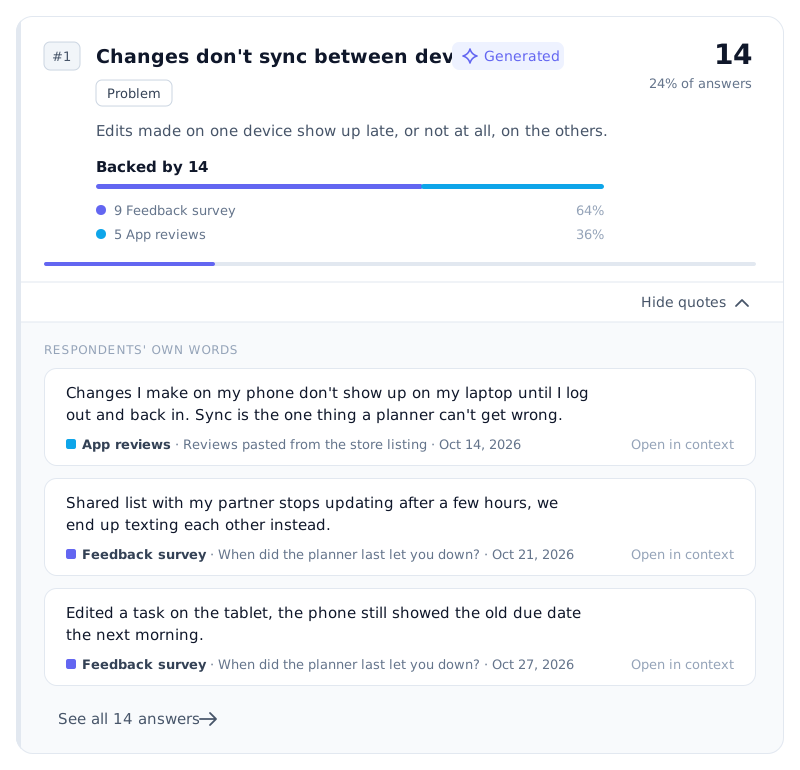
Illustration with example data.
One thing to know about the count. In a survey, one complete response is one person. With imported feedback, each review, e-mail or row counts as one, so a customer who sent three e-mails about the same thing counts three times. Look through the full list for the same person writing again before you read the number as people.
For step 5, pick a week or a month and compare it with an earlier one. Every insight shows its share of answers in both periods and how many percentage points it moved, and a problem that grows is marked red. Each share is counted against that period's own responses, so a busier month doesn't make a problem look bigger.
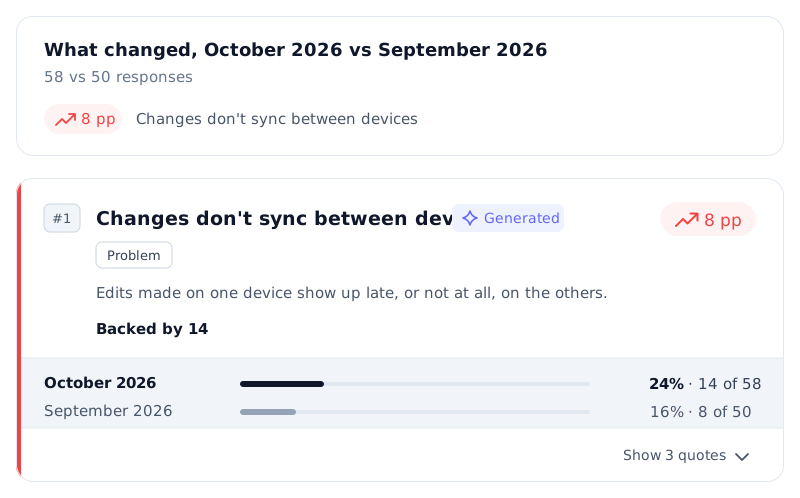
Illustration with example data.
With fewer than ten complete responses, RawQuotes names no insight and shows a count instead. At that stage you read every answer yourself anyway, which is step 2.
Where this method stops
The three marks show that something hurt someone. They don't show how many of your customers it hurts, or which fix anyone would pay for. The people who answer are not all your customers, and someone who got used to a workaround long ago may not think to mention it. Use the marks to decide what to look into next, then talk to the people behind the quotes.
If you want to run this on your own feedback, see the plans.