Ask about one recent moment, not for an opinion. "What were you trying to do the last time the app slowed you down?" gets a story. "Any feedback?" gets silence or "looks cool". Ask one question, right when the moment happens. Let people start with a tap, then ask one short written question that fits what they tapped. When the replies come in, look for moments told in the person's own words, and give agreement almost no weight.
Why "Any feedback?" gets you nothing to act on
A question with no moment in it leaves all the work to the reader. They have to remember something, decide whether it matters and put it into words for someone they don't know. Most people skip it. The ones who answer write whatever is quickest: "looks good", "nice idea", "yes, that's a problem".
You can't act on any of them. "Looks cool" means the person was being polite. "Yes, that's a problem" means they accepted the way you described the problem, and you wrote that description yourself. You still don't know what happened to anyone, when it happened or what it cost them, and that's the part you could act on.
Questions about the future fail the same way. "Would you use a shared calendar?" asks for a prediction, and saying yes costs nothing. A 15-minute call is a much bigger ask, and few people will give it to a product they barely know. That's where a lot of people asking for feedback get stuck.
The method, step by step
1. Ask about one moment, not an opinion
Point the question at a specific time: the last time, today, just now. "The last time you planned a week with someone, how did you do it?" can be answered from memory, and the answer often names what they did instead: a spreadsheet, a group chat, a screenshot. That workaround tells you more than any rating. The post on telling a real pain from a feature wish covers how to read answers like these.
2. Make it one question, asked when it happens
One question on the screen right after the moment works better than a long form a week later. Ask after the sign-up, after the first shared list, at the cancel button. The memory is fresh and answering takes a few seconds. If you have five things to learn, ask them in five places over a few weeks, one question each, instead of putting them all in one form.
3. One tap first, then a short written follow-up that fits the tap
A closed question with three or four options gets people started, because tapping is easy. The written question comes second and depends on the tap. Someone who tapped "Gave up partway" sees "Where did you stop, and what did you do instead?". Someone who tapped "Done, no trouble" sees "What made it easy?". Each person answers one written question that matches what they just told you, and the taps give you a rough split before you read any of the text.
4. Take out the leading and yes/no questions
Read your question and think about the laziest possible answer. If that answer is "yes", rewrite the question.
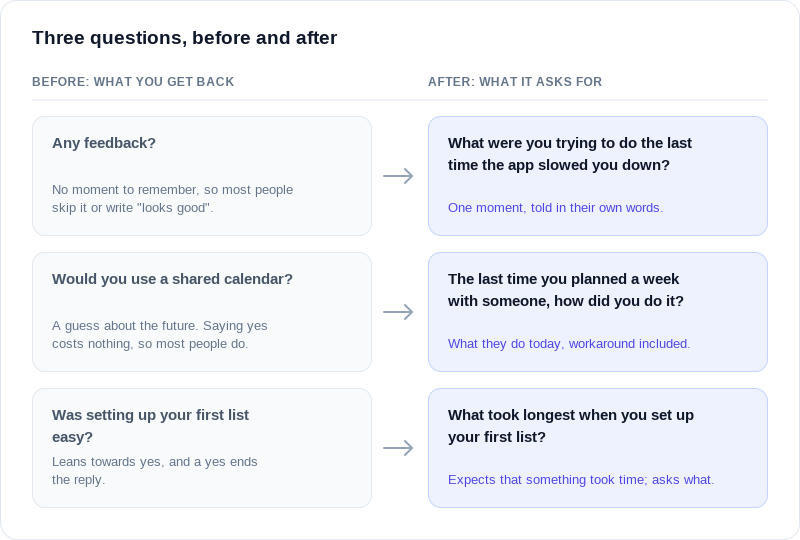
"Was it easy?" leans towards yes. "What took longest?" assumes something took time and asks which part. "Would you use it?" asks for a guess. "How did you do it last time?" asks about something they already did.
5. Know which reply is worth reading twice
The useful reply names a moment in the person's own words: "my partner couldn't see the list until she made an account". Agreement, praise and the name of a feature tell you much less. Read the replies with a moment in them twice, because that's where you find what it cost and what they did about it.
Example questions you can copy
After a sign-up:
- "What were you using for this until today?" Shows what you're replacing and why it stopped being enough.
- "What made you sign up today and not last month?" Finds the moment that pushed them, which is often the problem you solve.
At cancel, or when someone stops coming back:
- "What happened the last time you opened the app?" You get the moment they stopped, not a reason picked from a list.
- "What are you using instead now?" Names the alternative that won.
For a validation e-mail, before you have much to show:
- "The last time you had to do this, how did you do it?" Replace "this" with the job your product is for.
- "What have you already tried to fix it?" Use it instead of "Would you pay for this?". Someone who has already paid or put in hours has a real problem. A yes on the e-mail doesn't tell you that.
How to read what comes back
Read every reply before you group anything. Then put together the ones that describe the same moment, keep the person's words under each group, and count people, not mentions. Someone who wrote three angry paragraphs is still one person. Until there are enough replies for a pattern to mean anything, read them one by one and don't call anything a trend. RawQuotes draws that line at ten complete responses.
Doing it in RawQuotes
The default survey template already works this way: one closed question answered with a single tap, then one short written follow-up chosen by what was tapped. You can rewrite both, and set any question to show only when an earlier one was answered a certain way, so each option gets its own follow-up. The survey goes on any page where you can add one script tag, your web app included. For people you can't reach in the product, send its link in an e-mail.
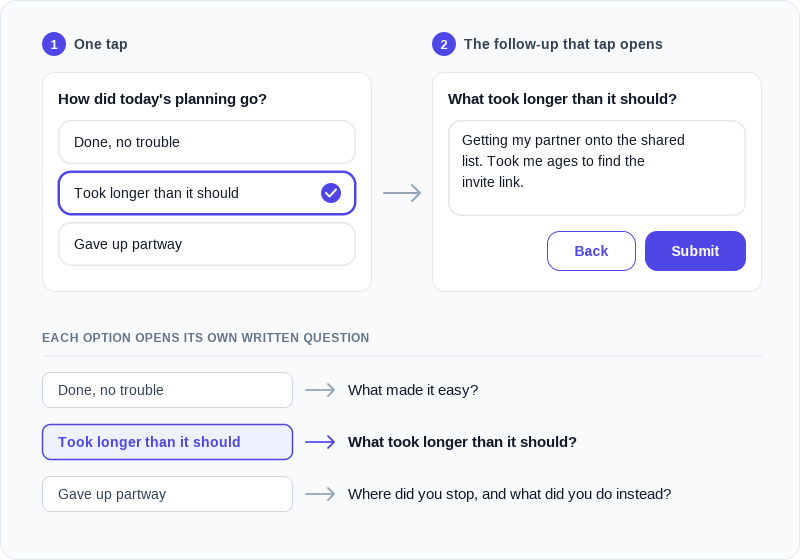
Illustration with example data.
Once the answers are in, RawQuotes groups the repeats into named insights. Each insight shows how many responses back it and opens into quotes, word for word, each with the question it answered and its date. Since every quote shows its question, you can see which wording got people to describe a moment and which one only got them to agree. Keep the first kind of question and rewrite the second.
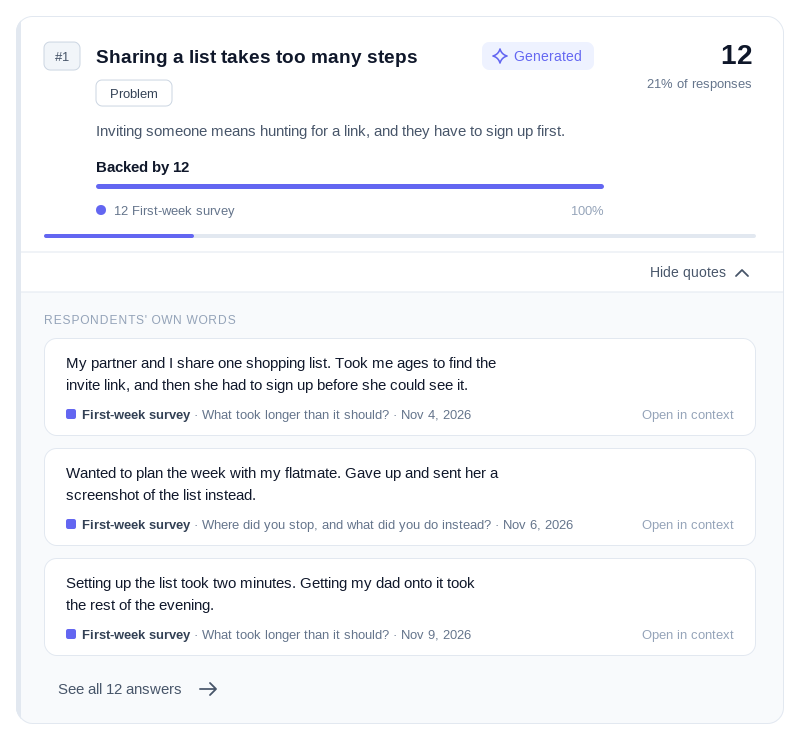
Illustration with example data.
With fewer than ten complete responses, RawQuotes names no insight and shows a count instead. At that stage you read every answer yourself anyway, which is step 5.
Where this method stops
A well-worded question only reaches the people who see it. Someone who left after one day and never opens your e-mail won't answer it, and the people who do answer are not all your customers. A few sharp replies show you where to look, not how many people it affects. When a reply describes a moment that matters, the next step is a conversation with the person who wrote it.
If you want to try this on your own product, see the plans.